 [b]How Does It Work?[/b]
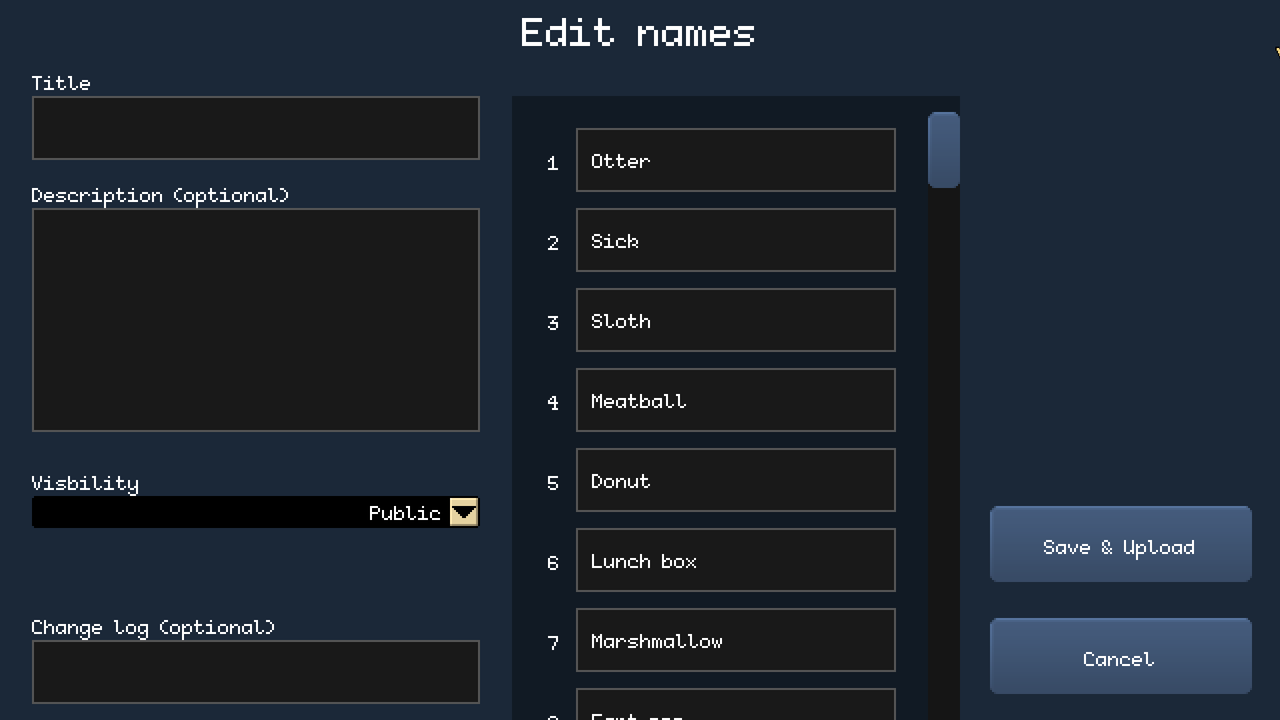
Access the Name Editor: In the Options menu, you'll find the Custom Names button to access the Name Editor. From there, you can choose from community created name sets or create new ones.
Upload and Download from Steam Workshop: Once you've created a name set, you can upload it to Steam Workshop with just pressing the 'Save & Upload button'.
Manage Your Creations: All downloaded name sets will be easily manageable through a button that let you modifiy the name set.
Thank You for Your Support!
This update came to life thanks to your fantastic feedback. I'm excited to see what you'll create and share on Steam Workshop! Keep sending me your ideas and suggestions; they help me improve and make Full Metal Sergeant even more engaging and fun.
Happy training, sergeants!
Best regards,
Carlo, the creator of Full Metal Sergeant
[b]How Does It Work?[/b]
Access the Name Editor: In the Options menu, you'll find the Custom Names button to access the Name Editor. From there, you can choose from community created name sets or create new ones.
Upload and Download from Steam Workshop: Once you've created a name set, you can upload it to Steam Workshop with just pressing the 'Save & Upload button'.
Manage Your Creations: All downloaded name sets will be easily manageable through a button that let you modifiy the name set.
Thank You for Your Support!
This update came to life thanks to your fantastic feedback. I'm excited to see what you'll create and share on Steam Workshop! Keep sending me your ideas and suggestions; they help me improve and make Full Metal Sergeant even more engaging and fun.
Happy training, sergeants!
Best regards,
Carlo, the creator of Full Metal SergeantNews Liste Full Metal Sergeant
 [b]How Does It Work?[/b]
Access the Name Editor: In the Options menu, you'll find the Custom Names button to access the Name Editor. From there, you can choose from community created name sets or create new ones.
Upload and Download from Steam Workshop: Once you've created a name set, you can upload it to Steam Workshop with just pressing the 'Save & Upload button'.
Manage Your Creations: All downloaded name sets will be easily manageable through a button that let you modifiy the name set.
Thank You for Your Support!
This update came to life thanks to your fantastic feedback. I'm excited to see what you'll create and share on Steam Workshop! Keep sending me your ideas and suggestions; they help me improve and make Full Metal Sergeant even more engaging and fun.
Happy training, sergeants!
Best regards,
Carlo, the creator of Full Metal Sergeant
[b]How Does It Work?[/b]
Access the Name Editor: In the Options menu, you'll find the Custom Names button to access the Name Editor. From there, you can choose from community created name sets or create new ones.
Upload and Download from Steam Workshop: Once you've created a name set, you can upload it to Steam Workshop with just pressing the 'Save & Upload button'.
Manage Your Creations: All downloaded name sets will be easily manageable through a button that let you modifiy the name set.
Thank You for Your Support!
This update came to life thanks to your fantastic feedback. I'm excited to see what you'll create and share on Steam Workshop! Keep sending me your ideas and suggestions; they help me improve and make Full Metal Sergeant even more engaging and fun.
Happy training, sergeants!
Best regards,
Carlo, the creator of Full Metal Sergeant