SETUP
[olist] [*] While on the game's main menu (before starting your world), click on the gears icon on the top left to bring up the options. [*] Enter your Twitch Channel name. For example, if your channel is https://www.twitch.tv/abcdef, you would enter "abcdef" (without the quotes) and hit Enter. Doing so will open up additional options. [*] Enter the username you wish to use. It can match your channel name, but it can also be the username of your bot you wish to use. [*] Go to https://twitchapps.com/tmi/ to get your OAUTH token, and enter it in the OAUTH field. This should be the full token, for example: "oauth:ou99kxgkh12cgdbv3h4mieyj5yowqr". The OAUTH token is what allows the game to talk back to Twitch viewers on your behalf. [*] Enable the [b]Interaction[/b] option, and if you wish -- the [b]Chat[/b] option as well. Interaction is what allows the game to respond to keywords in Twitch chat, while Chat allows your game to display Twitch chat in the in-game chat window. Both can be toggled from within your game later. [*] Play the game! You can test the functionality by using the !p5 command in Twitch chat (but this won't work if you do it from the same account as the "username" from the step 3). [/olist]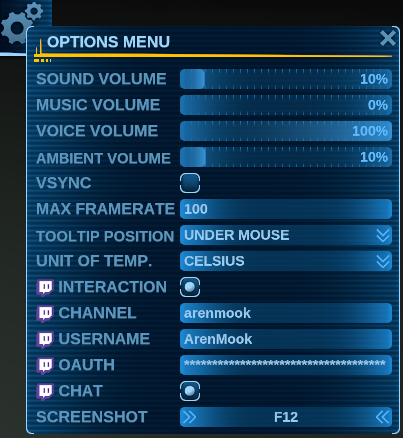
COMMANDS
Your viewers will have the ability to use the following commands, which can be both used in public, as well as PM'd to the 'username' from step 3, above:- [b]!p5[/b] -- Messages the viewer the list of usable commands.
- [b]!points[/b] -- Shows how many points the viewer has accumulated. Viewers automatically start to accumulate points once they speak in chat or use one of the commands. Each of the following actions costs points to use.
- [b]!voice[/b] -- 18 points. Plays a random voice over and puts the viewer in combat for 30 seconds.
- [b]!loot[/b] -- 30 points. Spawns a random upgrade for the streamer somewhere nearby and shows an alert with the name of the viewer that has done so.
- [b]!trader[/b] -- 60 points. Creates a neutral trader NPC that will fly up to the streamer. This NPC, like all NPCs spawned by the commands here, [b]will have the name of the viewer that used the command[/b].
- [b]!pirate[/b] -- 60 points. Spawns an unfriendly NPC that will fly up to the streamer and either attack outright (if a weapon is equipped), or offer to be bribed (if no weapon is equipped).
- [b]!encounter[/b] -- 60 points. Creates a random encounter. This can be a pirate, a trader, or a random quest. Like all encounters, it will vary with the level and weapon loadout of the streamer's vehicle.
- [b]!ufo1[/b] -- 30 points. Spawns a Tier 1 UFO that will float around nearby, behaving like they usually do -- without a particular purpose.
- [b]!ufo2[/b] -- 60 points. Spawns a Tier 2 UFO that will fly around, scanning loot and attacking anyone that dares to touch it near them.
- [b]!ufo3[/b] -- 120 points. Spawns a Tier 3 UFO.
- [b]!revive[/b] -- 6 points. Revives the streamer after they have been defeated in combat. Good thing Twitch viewers are nice and will ever chain-revive the streamer with hostiles nearby just to watch them die again and again.
- [b]!buff[/b] -- 20 points. Places a buff on the streamer's vehicle that will instantly heal the streamer if they happen to be defeated, giving them another chance. The buff lasts 60 seconds. Only works if used while the streamer's vehicle is still alive, but can also be used after a !revive.
- [b]!troll[/b] -- 120 points. This... is an unpredictable one. Let's just say its name is well deserved and leave it at that... :) Regardless of the outcome of this command, it will also create an item for the streamer somewhere nearby. Just to be nice.
- [b]!healer[/b] -- 27 points. Spawns a healer NPC to follow the streamer.
- [b]!support1[/b] -- 9 points. Spawns a supporting (friendly) NPC to help the streamer.
- [b]!support2[/b] -- 27 points. Spawns a stronger version of the friendly supporting NPC.
- [b]!attack1[/b] -- 9 points. Spawns a hostile NPC to try to kill the streamer.
- [b]!attack2[/b] -- 27 points. Spawns a stronger version of the hostile NPC to try to kill the streamer.