 In recent weeks, we put a lot of effort into making sure that seaborne invasions play well in the game. This is important because these air/naval operations were such a feature of the Allied campaign. Counting just the historical ones, there’s six: Torch, Husky, Salerno, Anzio, Normandy, and Dragoon.
Granted, we have decided to start the campaign at Wadi Akarit, after the Torch landings, but that still leaves us with five so… invasions aplenty. Speaking of Torch, the period between it and the allied link-up in Tunisia will now feature in the tutorial, not the main campaign. Sadly this leaves Kasserine Pass outside the campaign, but we’ll try to make it up with a standalone scenario.
[i]We’ve been working on the campaign quite a lot, and since campaign play revolves around HQ upgrades, I feel that it’s time to do a proper Headquarters deep dive. In fact, the bulk of this post will be about HQs and the campaign, but let’s quickly talk about invasions first because there is a screenshot, and it is a-mazing.[/i]
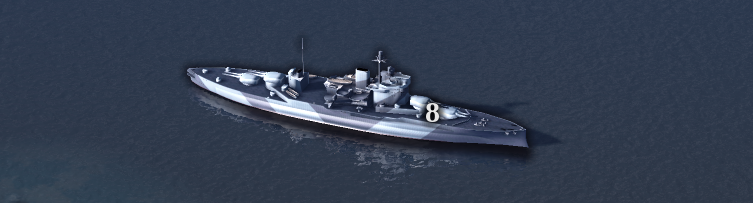
The invasion force in the screenshot below is typical for Allied operations of this kind. It has battleships providing [b]naval defensive fire[/b], LCVP landing craft ferrying the units involved in the [b]naval assault[/b], and a plane carrying [b]paratroopers[/b]. It should really be a C-47 but we don’t have them in the game yet (can you tell which plane we’re using instead? Also, which bb?)
In recent weeks, we put a lot of effort into making sure that seaborne invasions play well in the game. This is important because these air/naval operations were such a feature of the Allied campaign. Counting just the historical ones, there’s six: Torch, Husky, Salerno, Anzio, Normandy, and Dragoon.
Granted, we have decided to start the campaign at Wadi Akarit, after the Torch landings, but that still leaves us with five so… invasions aplenty. Speaking of Torch, the period between it and the allied link-up in Tunisia will now feature in the tutorial, not the main campaign. Sadly this leaves Kasserine Pass outside the campaign, but we’ll try to make it up with a standalone scenario.
[i]We’ve been working on the campaign quite a lot, and since campaign play revolves around HQ upgrades, I feel that it’s time to do a proper Headquarters deep dive. In fact, the bulk of this post will be about HQs and the campaign, but let’s quickly talk about invasions first because there is a screenshot, and it is a-mazing.[/i]
The invasion force in the screenshot below is typical for Allied operations of this kind. It has battleships providing [b]naval defensive fire[/b], LCVP landing craft ferrying the units involved in the [b]naval assault[/b], and a plane carrying [b]paratroopers[/b]. It should really be a C-47 but we don’t have them in the game yet (can you tell which plane we’re using instead? Also, which bb?)
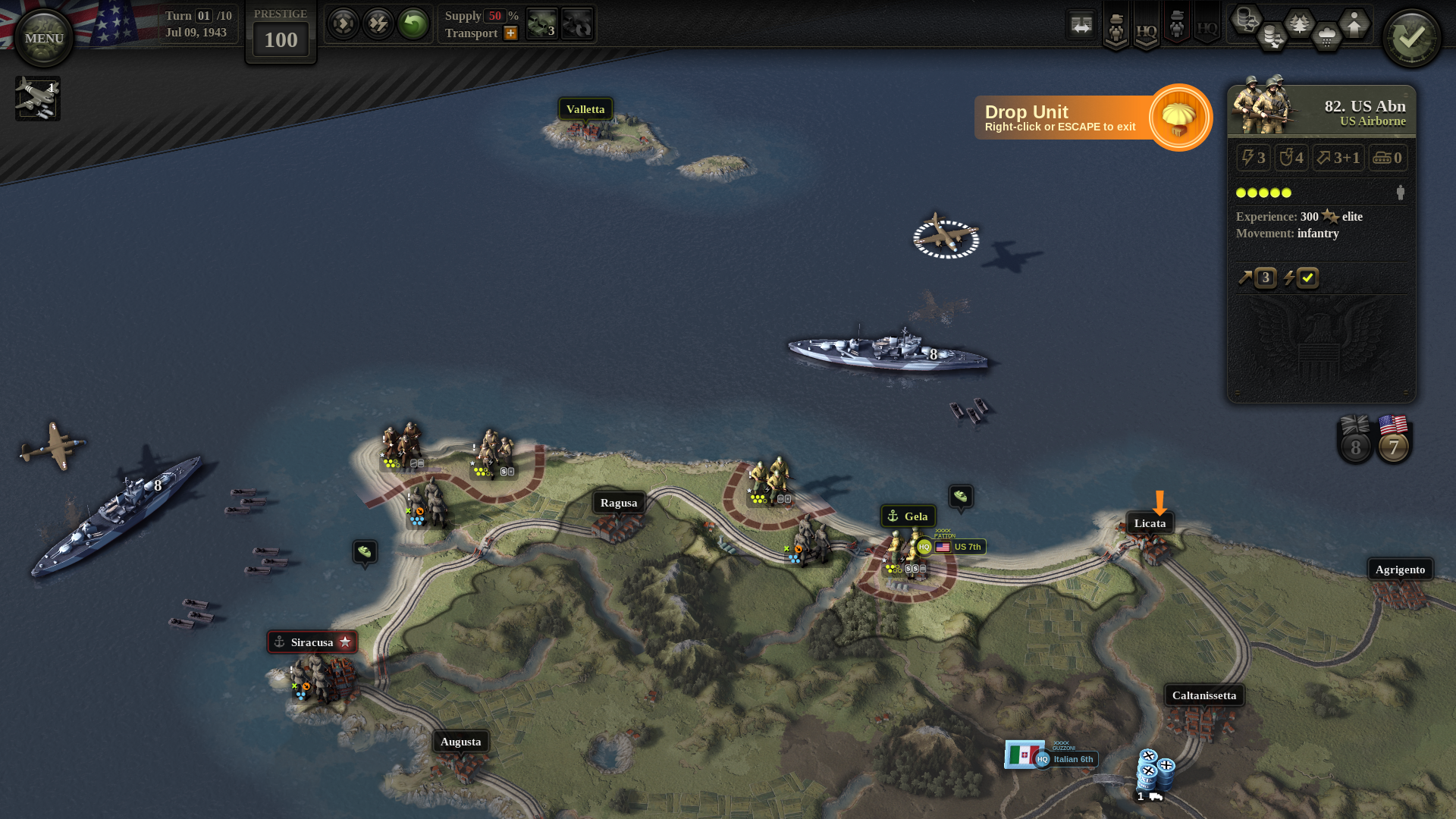 Mechanically, [b]naval assaults[/b] and [b]para drops[/b] basically do “what it says on the tin”. Assuming an assault goes well, the unit lands with [b]no MPs[/b] and [b]no AP[/b], or with its [b]AP locked[/b] if the landing was unopposed. This is consistent with other game mechanics, such as river crossings.
On the following enemy turn, the battleships will be providing [b]naval defensive fire[/b], covering the landing beach hexes. This works out to a [b]-3 [/b]artillery (-like) shift against any enemy units attacking our units on the beach.
Mechanically, [b]naval assaults[/b] and [b]para drops[/b] basically do “what it says on the tin”. Assuming an assault goes well, the unit lands with [b]no MPs[/b] and [b]no AP[/b], or with its [b]AP locked[/b] if the landing was unopposed. This is consistent with other game mechanics, such as river crossings.
On the following enemy turn, the battleships will be providing [b]naval defensive fire[/b], covering the landing beach hexes. This works out to a [b]-3 [/b]artillery (-like) shift against any enemy units attacking our units on the beach.
HQ Command Points
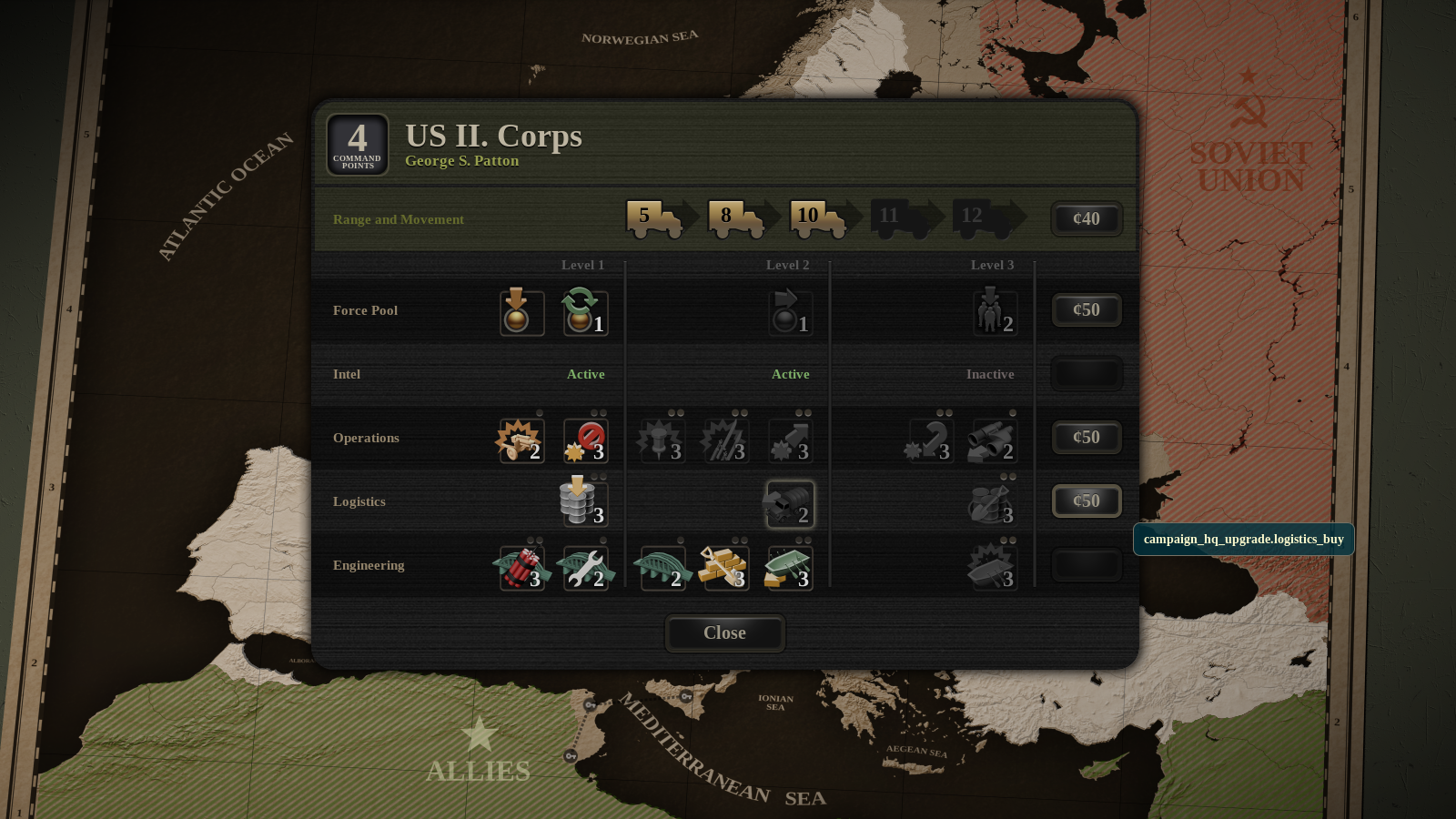
We already mentioned HQs in [url=https://steamcommunity.com/games/809230/announcements/]earlier diaries,[/url] and described how they are used for various command and [b]support actions[/b]. The actions include everything from [b]bridge repairs[/b] to [b]unit reorganization[/b], and performing each one costs some number of [b]command points[/b] (CPs). The number of command points available per turn represents overall commander and staff proficiency of an HQ – there are only so many things an organization can do at once. While coordinating a [b]set piece attack[/b] at the front, the HQ can’t also be building [b]fortifications[/b] or doing [b]emergency supply[/b] runs. As the campaign game progresses, the number of CPs per turn can be increased. This represents an improvement in HQ staff skill, and happens at times when its units have earned enough [url=https://unityofcommand.net/blog/2016/01/28/dev-diary-3-are-you-experienced/]xp[/url] to merit an upgrade. At that point, the player may choose to increase the number of CPs per turn (overall skill) or to reduce the CP cost of one specific action (specialize).HQ Branches
HQs are divided into five branches: Force Pool, Intel, Operations, Logistics, and Engineering. Every action belongs to some branch: for example, bridge repair to engineering. Branches are further divided into three levels, not all of which are always [b]unlocked[/b]. In the screenshot, the US II Corps HQ has [b]Level-1[/b] Force Pool, meaning only [b]deploy[/b] and [b]reorg[/b] actions are available. The higher levels of this branch are [b]locked[/b], and so [b]transfer step[/b] and [b]security unit[/b] actions are not available to the player. The player can unlock higher branch levels at [b]conferences[/b], which are breaks in the campaign game that happen once every six months or so. At a conference the player can, among other things, spend prestige to unlock higher levels of HQ branches.