- https://www.eveonline.com/news/view/sovereignty-updates-transition-and-upgrades
- https://store.steampowered.com/news/app/8500/view/4221643401455949514
- https://store.steampowered.com/news/app/8500/view/4174351800579482458
Netcode and Tick Rate
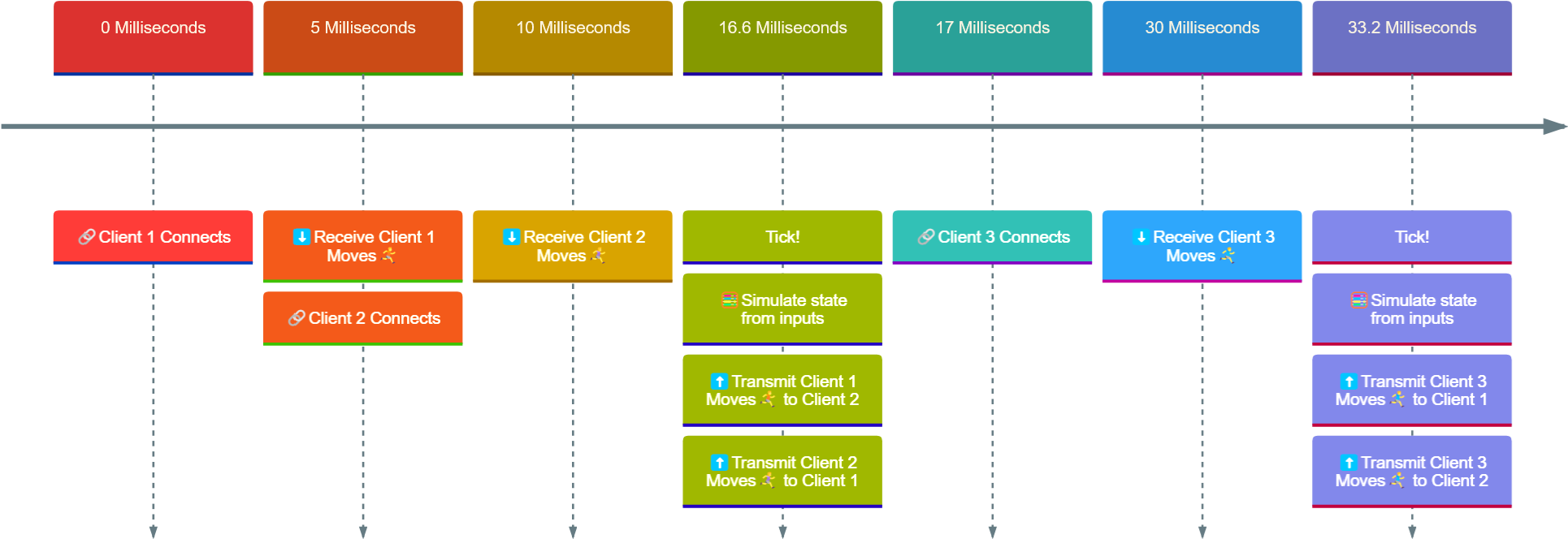
One of the most common challenges in multiplayer games is its network architecture, colloquially referred to as “[url=https://en.wikipedia.org/wiki/Netcode]netcode[/url]”. Whether striving to ensure a consistent experience for all players or to prevent cheating, the way information is transmitted to game clients plays a crucial role in the overall performance and enjoyment. A key factor here is tick rate - the frequency at which the game server updates and sends information to connected clients. Different game engines approach this in different ways. [url=https://dev.epicgames.com/documentation/en-us/unreal-engine/actor-relevancy-in-unreal-engine]Unreal Engine[/url], for example, emphasizes relevancy filtering, sending only the most important updates to each client, while [url=https://developer.valvesoftware.com/wiki/Source_Multiplayer_Networking]Source Engine[/url] focuses on input prediction, reducing the number of corrections needed to maintain smooth gameplay. Regardless of approach, tick rate remains a fundamental factor in network performance. Most games operate between 20Hz and 120Hz, depending on the number of players online, meaning that updates are sent between 20 and 120 times per second per client. For instance, at 60Hz, the server must process and send updates every 16.6 milliseconds to ensure that 60 updates can happen within one second, and leave room for other players to receive the same information in the same time frame. Assuming a magical latency-free internet connection bringing clients the game state directly on connect (let’s just pretend that exists), a 60Hz server would process game state updates like this:Two ticks of a 60hz Server
 Input prediction and movement interpolation can create the illusion of near real-time interaction, even without a magical zero-latency internet. But as tick rates drop, delays become more noticeable. Which sounds bad, right? So why would you ever want a lower tick rate?
Well, EVE Online has been around since the days of 56k modems. To keep bandwidth requirements low enough for massive space battles, the server tick rate was set to one second.
More specifically, the tick rate of the physics simulation is 1hz which dramatically reduces the need to send updates to the desktop clients.
Other interactions with elements that don’t affect physics are processed as quickly as the Python hamsters will go. This means that if an input is sent right before a tick, it feels highly responsive. If sent right after, it can feel like it takes a second or even more to see an effect (when factoring in real-world latency – GG, Australia). Technically, therefore, you could get into a good vibe with the server by pressing a key exactly once per second, but of course, for mental wellbeing, it can be very important to click “Jump” thirty times per second.
Input prediction and movement interpolation can create the illusion of near real-time interaction, even without a magical zero-latency internet. But as tick rates drop, delays become more noticeable. Which sounds bad, right? So why would you ever want a lower tick rate?
Well, EVE Online has been around since the days of 56k modems. To keep bandwidth requirements low enough for massive space battles, the server tick rate was set to one second.
More specifically, the tick rate of the physics simulation is 1hz which dramatically reduces the need to send updates to the desktop clients.
Other interactions with elements that don’t affect physics are processed as quickly as the Python hamsters will go. This means that if an input is sent right before a tick, it feels highly responsive. If sent right after, it can feel like it takes a second or even more to see an effect (when factoring in real-world latency – GG, Australia). Technically, therefore, you could get into a good vibe with the server by pressing a key exactly once per second, but of course, for mental wellbeing, it can be very important to click “Jump” thirty times per second.
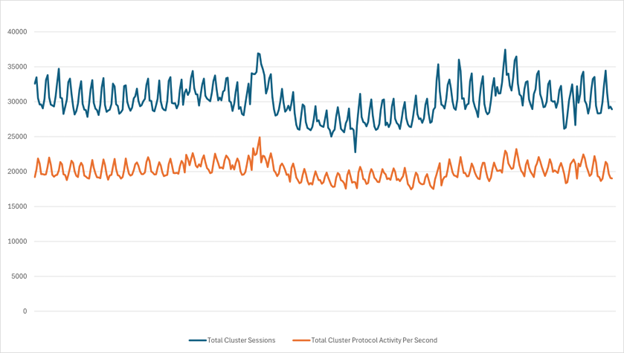 Looking holistically at Tranquility on average over the past year, it’s clear that the number of operations per second is proportional to the number of active capsuleers in the cluster. On average, each session processes around 0.7 operations per second, demonstrating how efficient EVE Online is at transmitting only the data that is necessary.
The numbers fluctuate, of course, and these are all averages. When fleet fights hit processing limits, Time Dilation (TiDi) kicks in. If you’re curious about the nuts and bolts of that, you can look at the [url=https://www.eveonline.com/news/view/time-dilation-hows-that-going]archive on TiDi[/url] to learn more.
Looking holistically at Tranquility on average over the past year, it’s clear that the number of operations per second is proportional to the number of active capsuleers in the cluster. On average, each session processes around 0.7 operations per second, demonstrating how efficient EVE Online is at transmitting only the data that is necessary.
The numbers fluctuate, of course, and these are all averages. When fleet fights hit processing limits, Time Dilation (TiDi) kicks in. If you’re curious about the nuts and bolts of that, you can look at the [url=https://www.eveonline.com/news/view/time-dilation-hows-that-going]archive on TiDi[/url] to learn more.
So Where do SKINs Come In?
Almost all cosmetic mechanisms in EVE Online are sent via simulation frames, EVE’s version of a tick. Before SKINR, ship SKIN changes were delivered with the next simulation frame that was sent to all relevant clients. In other words, SKIN updates could only happen once per second. Even without any rate limits on the UI or network requests, no matter how fast you would change SKINs, no one would be able to see more than one update per second, because that’s the limit on simulation frame transmission. There’s also another issue: fanout. (Last crash course, promise.) When you change your ship’s SKIN, the update needs to be sent to multiple recipients – what is referred to as “fanout”. But which ones need to receive the information? What happens if you are near a hundred other ships? What does “near” actually mean, and who are the other hundred? Simulation frames handle both problems by only processing updates for ships within the same bubble (colloquially grid - not to be confused with warp disruption bubbles). This approach comes at a cost, though, as more data per simulation frame means more serialization and fanout for the server simulating that solar system. Previously, Quasar only tracked which solar system a ship was in, but for SKINR to function in real time, it had to track ship movement between bubbles as well. This was no small feat. It required deep changes to EVE Online’s core simulation engine to allow Quasar to access its state in a way that hadn’t been done before. The result was shocking! A whopping 27x increase in processed data compared to the simple transitions between solar systems. Here’s a comparison of events per second between solar system travel and bubble travel – keep in mind that warping traverses multiple bubbles, not just “A to B”.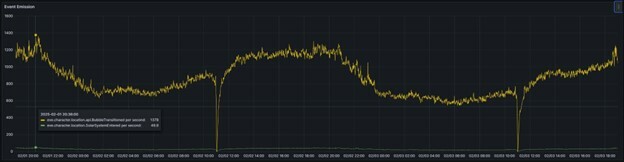 And that’s just internal traffic, before even considering the fanout problem!