Stardeus Modding Guide
What is JSON
JSON stands for [i]“JavaScript Object Notation”[/i], a human-readable plain text format. If you want to learn more about JSON, here’s a good resource: https://www.w3schools.com/js/js_json_intro.asp However, JSON is so simple that you can easily understand it just by looking at a few examples.How Stardeus uses JSON files
In Stardeus, behaviors are defined in C# code, which you can also mod but it requires programming knowledge and significantly more effort. Content and various parameters are defined in JSON files that the game loads at runtime. To illustrate this, let’s examine a device.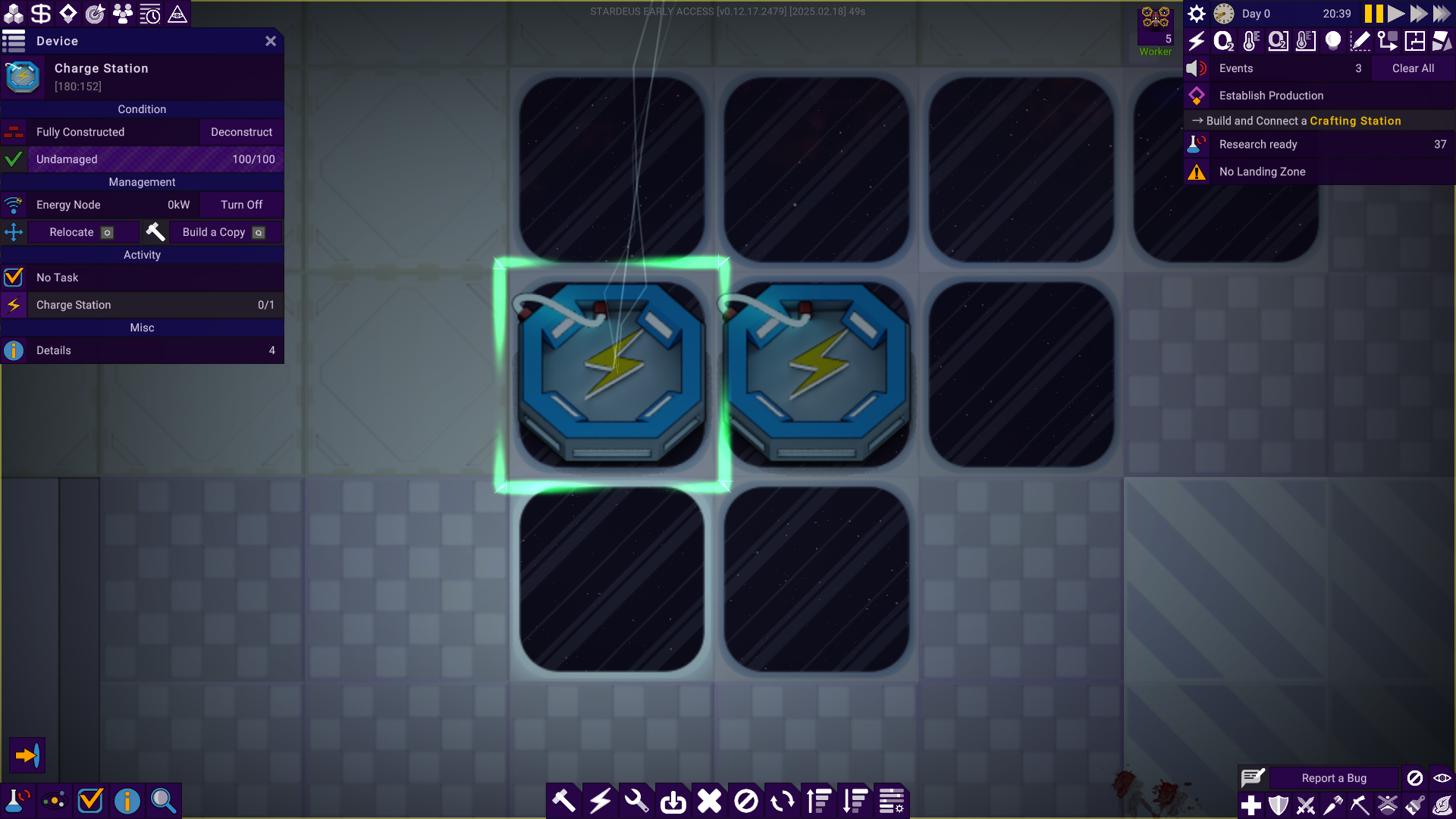 This is a [b]Charge Station[/b]. It has various properties and behaviors. The game recognizes the Charge Station because it loads a JSON file that defines it:
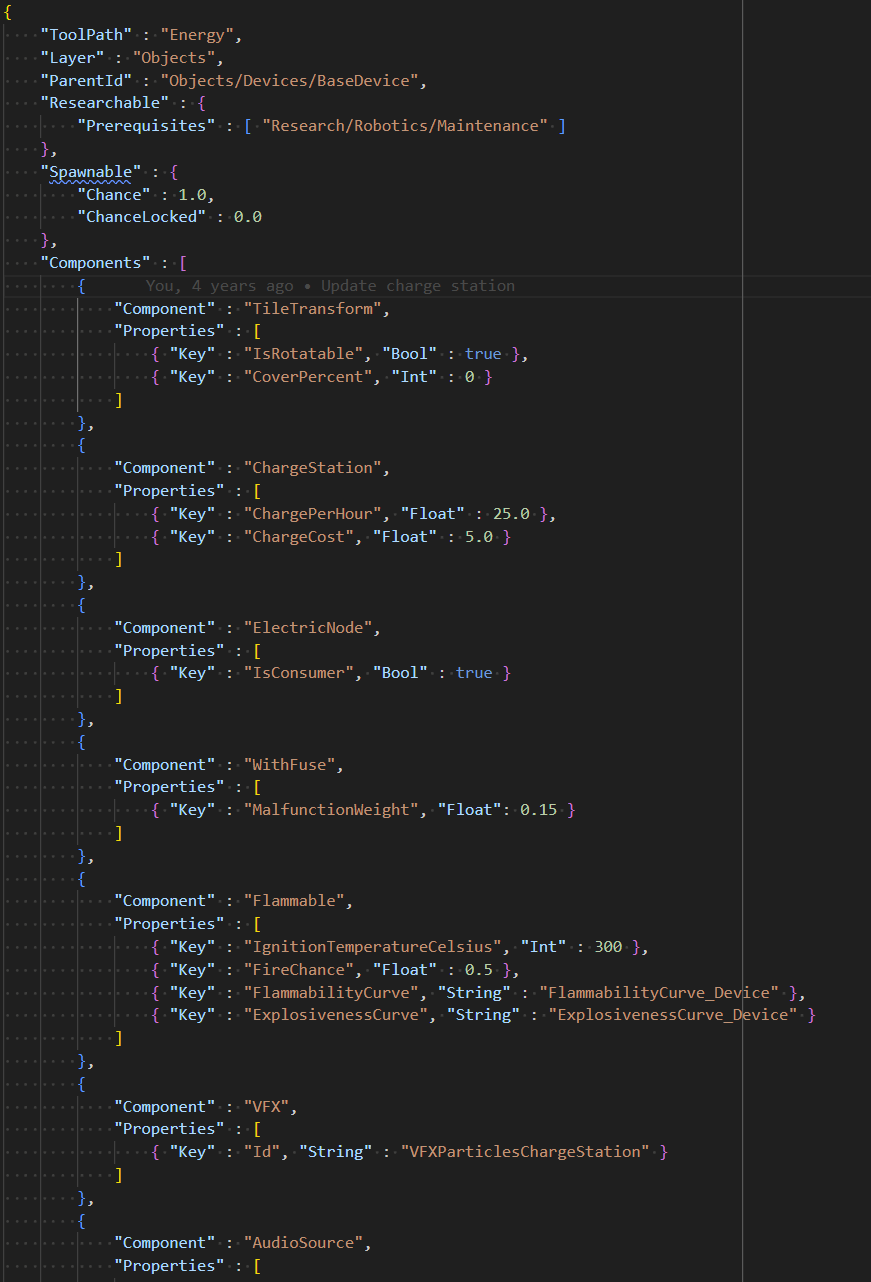 You can find this definition in the Core mod*:
[b]Definitions/Objects/Devices/ChargeStation.json[/b]
[i]* To open the contents of the Core mod, run Stardeus, then [b]Main Menu > Mods > Core Game > Open Directory[/b][/i]
This file specifies various properties of the [b]Charge Station[/b], such as the research required to unlock it and, most importantly, a list of Components.
Each [b]Component block [/b]provides a specific function. Many of these [b]components [/b]appear in other device definitions, but the [b]ChargeStation component[/b] is what makes this device unique. Removing this component block would strip the Charge Station of its ability to recharge robots.
If you wanted the Charge Station to work twice as fast, you could change the [b]ChargePerHour[/b] property from [b]25.0[/b] to [b]50.0[/b]. However, modifying the Core mod directly means your changes would be overwritten when the game updates. In this guide, we’ll learn how to create mods that edit JSON files without altering the Core mod itself.
Beyond object definitions, Stardeus includes many other JSON files for configuring different aspects of the game. Tunable parameters, story events, species configurations, body parts, inventory items, character traits—even UI colors—are all defined in JSON and [b]fully moddable[/b].
You can find this definition in the Core mod*:
[b]Definitions/Objects/Devices/ChargeStation.json[/b]
[i]* To open the contents of the Core mod, run Stardeus, then [b]Main Menu > Mods > Core Game > Open Directory[/b][/i]
This file specifies various properties of the [b]Charge Station[/b], such as the research required to unlock it and, most importantly, a list of Components.
Each [b]Component block [/b]provides a specific function. Many of these [b]components [/b]appear in other device definitions, but the [b]ChargeStation component[/b] is what makes this device unique. Removing this component block would strip the Charge Station of its ability to recharge robots.
If you wanted the Charge Station to work twice as fast, you could change the [b]ChargePerHour[/b] property from [b]25.0[/b] to [b]50.0[/b]. However, modifying the Core mod directly means your changes would be overwritten when the game updates. In this guide, we’ll learn how to create mods that edit JSON files without altering the Core mod itself.
Beyond object definitions, Stardeus includes many other JSON files for configuring different aspects of the game. Tunable parameters, story events, species configurations, body parts, inventory items, character traits—even UI colors—are all defined in JSON and [b]fully moddable[/b].
Creating a Mod
The easiest way to create a new mod is to grab a copy of the empty mod here: https://github.com/kodolinija/stardeus-mod-empty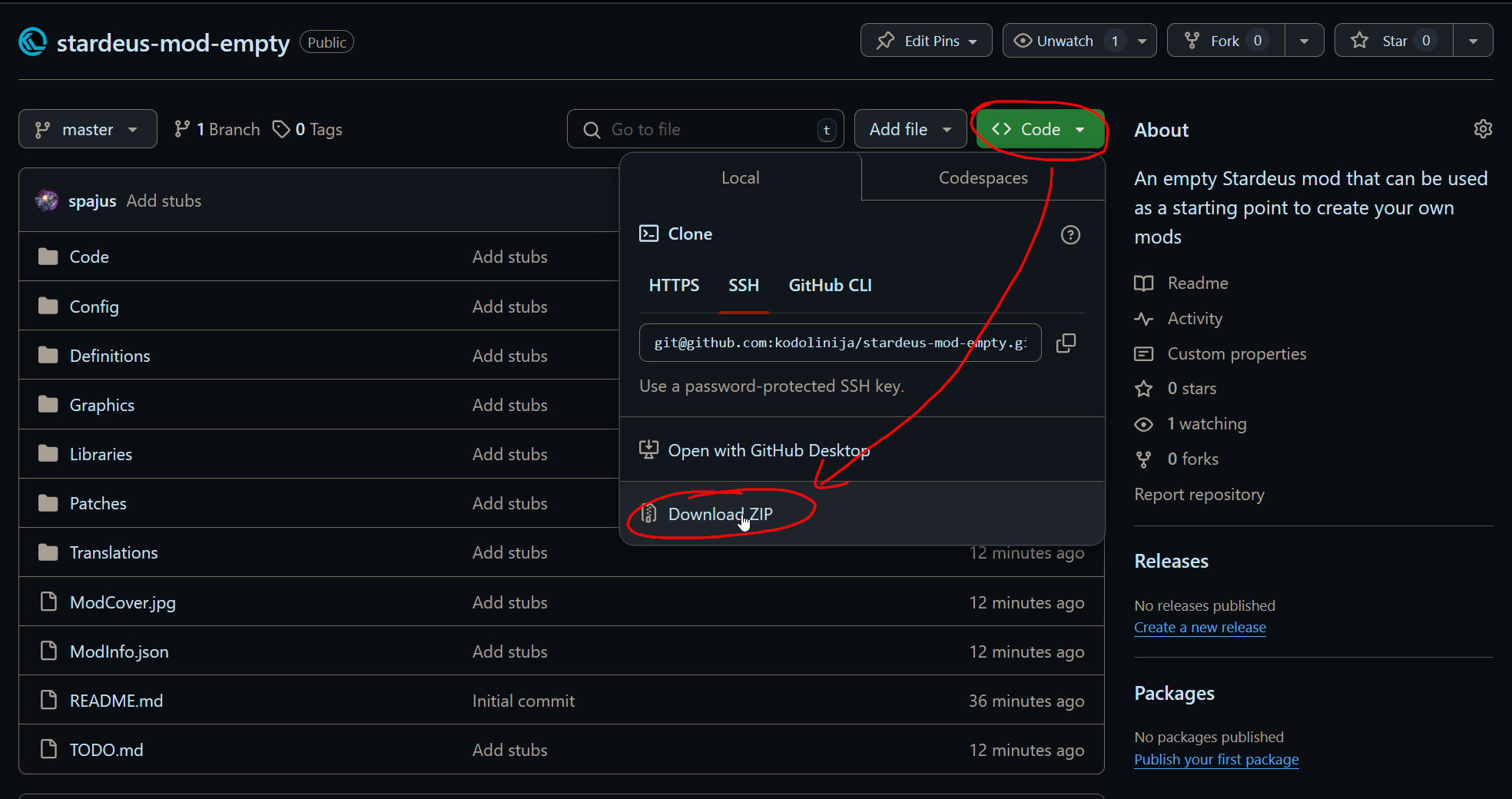 Download the project as a zip file, extract it in the user mods folder*, rename the extracted folder to match your mod name (I like using the kebab-case when naming folders).
[i]* User mods folder is located next to the Saves folder. You can open it from Stardeus:
[b]Main Menu > Mods > About Mods > Open User Mods Directory[/b][/i]
Then open the [b]TODO.md[/b] file and go through the checklist:
[code]- [ ] Update ModInfo.json
- [ ] Create your own ModCover.jpg
- [ ] Delete unnecessary directories
[/code]
Run Stardeus and check if your empty mod appears in the [b]Main Menu > Mods[/b] list. If it does, you're ready to start modding!
Download the project as a zip file, extract it in the user mods folder*, rename the extracted folder to match your mod name (I like using the kebab-case when naming folders).
[i]* User mods folder is located next to the Saves folder. You can open it from Stardeus:
[b]Main Menu > Mods > About Mods > Open User Mods Directory[/b][/i]
Then open the [b]TODO.md[/b] file and go through the checklist:
[code]- [ ] Update ModInfo.json
- [ ] Create your own ModCover.jpg
- [ ] Delete unnecessary directories
[/code]
Run Stardeus and check if your empty mod appears in the [b]Main Menu > Mods[/b] list. If it does, you're ready to start modding!
Changing Existing Behaviors and Parameters
Previously, modifying a JSON file required copying the entire file into your mod just to change a few lines. The game would then load the modded version instead of the original. The main problem with this method was that when the Core mod updated, the copied JSON file could become outdated or broken. This often caused older mods to stop working or, worse, [b]silently break [/b]parts of the game. The new approach—JSON patching—solves this issue. Here’s how it works:- Mods define patches.
- Patches target specific core JSON files.
- A patch contains a list of operations to modify the targeted JSON.
- Operations can add, remove, or replace parts of the original JSON.
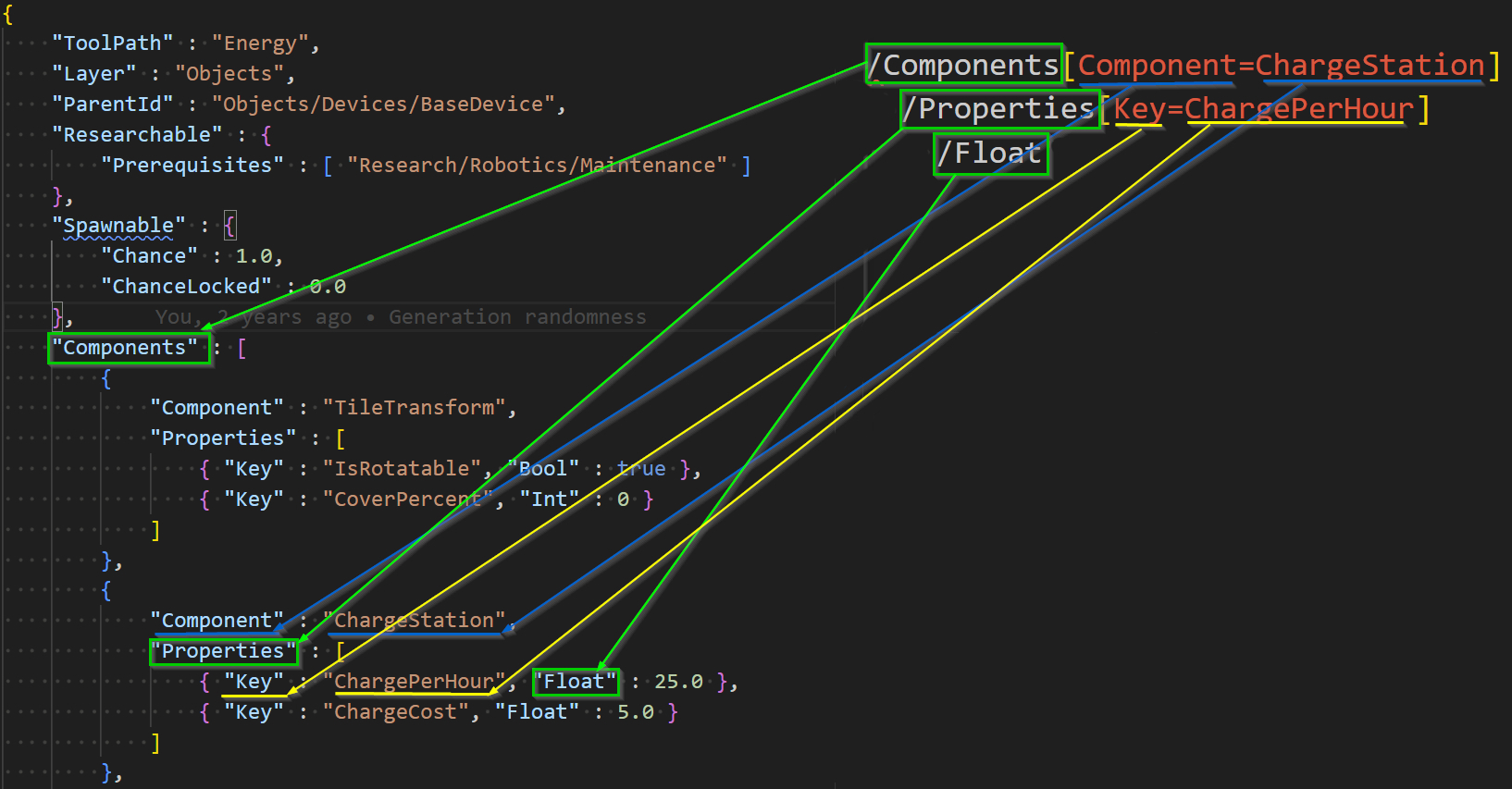 OK, I admit it still looks a bit scary here. But the good news is that it’s the most complex path example I could come up with. If you understand this one, you’re going to be [b]unstoppable[/b]!
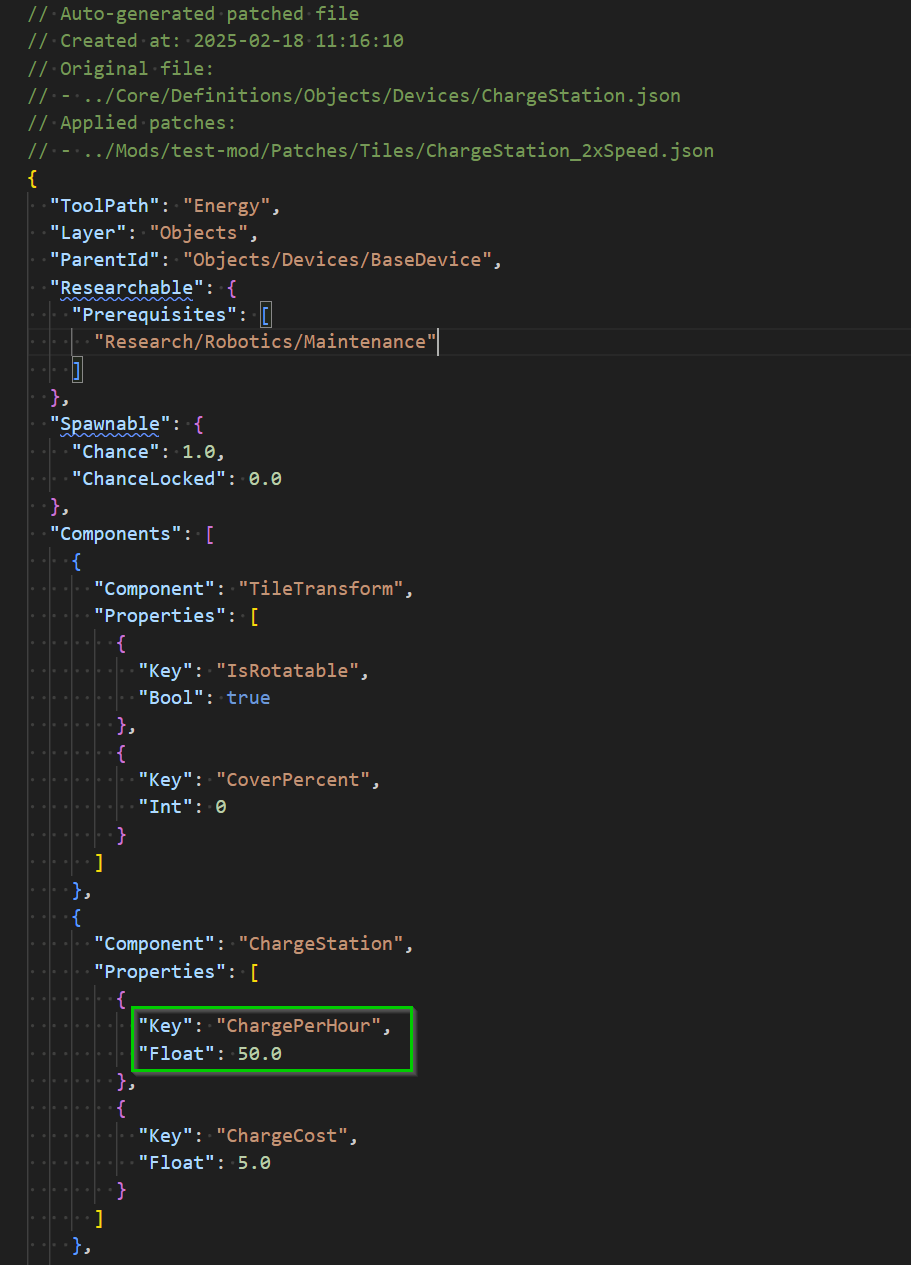
Now, what happens when the game loads your mod with this patch? Next to the user [b]Mods[/b] directory, a [b]Patched[/b] directory will be created. If you look inside, you should find the patched [b]ChargeStation.json[/b] file that looks something like this:
OK, I admit it still looks a bit scary here. But the good news is that it’s the most complex path example I could come up with. If you understand this one, you’re going to be [b]unstoppable[/b]!
Now, what happens when the game loads your mod with this patch? Next to the user [b]Mods[/b] directory, a [b]Patched[/b] directory will be created. If you look inside, you should find the patched [b]ChargeStation.json[/b] file that looks something like this:
 More examples of how to write various JSON patches can be found here:
https://github.com/kodolinija/stardeus-mod-template/tree/master/Patches
More examples of how to write various JSON patches can be found here:
https://github.com/kodolinija/stardeus-mod-template/tree/master/Patches