Territory Control Overhaul
Information Stream
Yesterday we revealed more details surrounding the Territory Control Overhaul feature during a livestream on the official [url=https://www.twitch.tv/mortalonline2]MortalOnline2 Twitch channel[/url]. https://www.youtube.com/watch?v=PKZTOEhpmlI [hr][/hr]Overview – What is Changing?
Currently the only major form of large scale Territory Control in game has been tied to the Keeps, which are able to grow their Territory area based on how high their Guild Tier is. Keep Territory areas then collide with each other are can not grow while touching another Keep’s Territory area. The idea behind this mechanic was to fuel conflicts from the desire to continue to grow past any other Keep Territories which may be adjacent to yours. This design however had several problems, most of which many of you in the community are already aware of, such as not enough benefits to owning a Keep or increasing your Territory size beyond earning more taxes from player houses as well as being able to build Territory Control structures anywhere inside your Territory without the use of Claiming Stones. Additionally, this limited the mechanics of large scale Territory Control to only those guilds who own Keeps, of which there are 16 on Myrland, leaving out all other guilds. To address these problems, we have gone back to the drawing board, overhauled this system of Territory Control and completely scrapped the growing and colliding Keep circles. Instead, we have split up Myrland into fixed capturable Regions to compete over via more engaging mechanics, each offering their own benefits. [hr][/hr]Regions of Myrland
The continent has now been separated into 31 distinct named Regions. The map below shows the current layout and size of these Regions, however the final map will look somewhat different regarding specific border positions: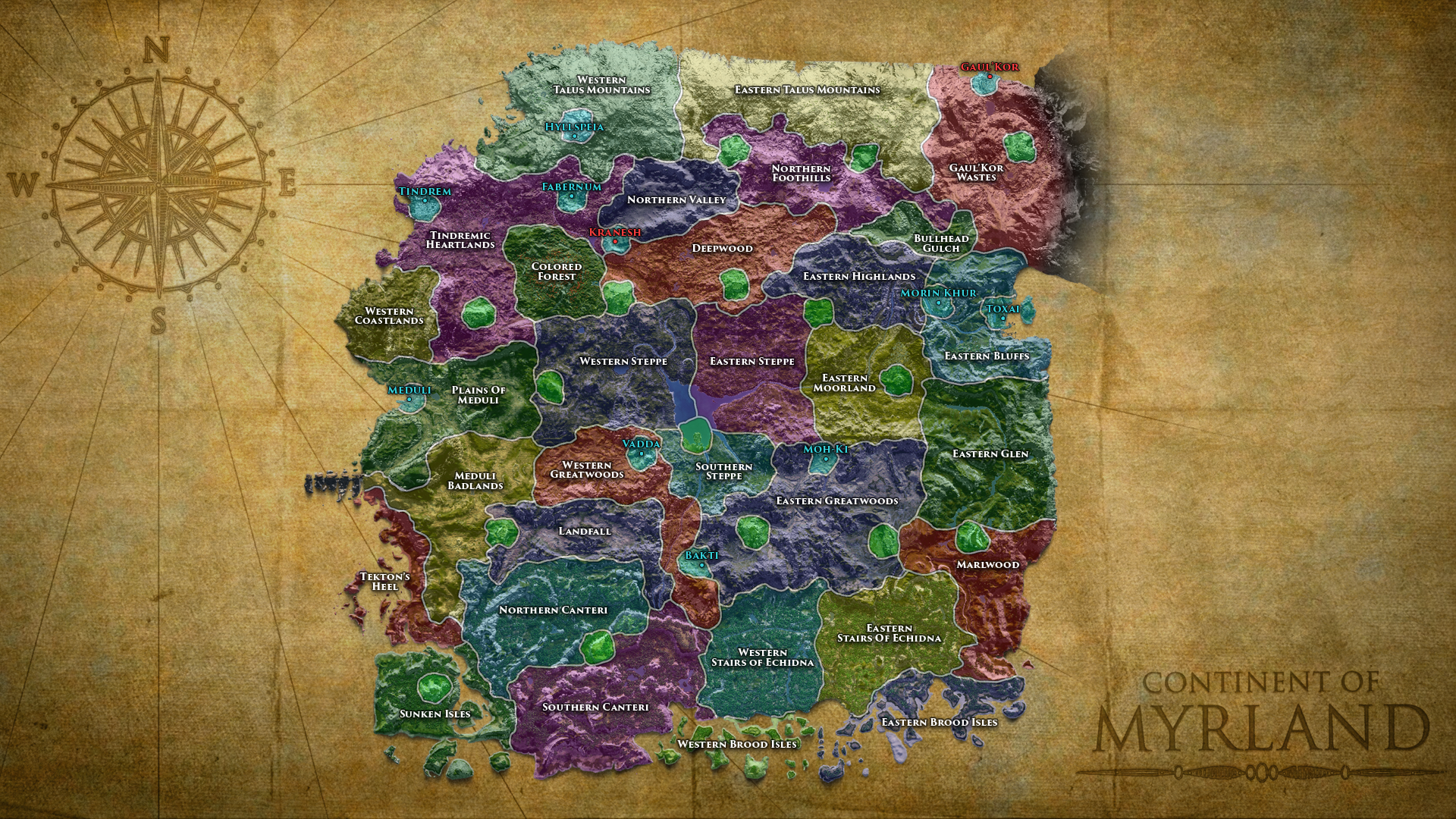 Any guild may contest and claim any of these Regions by engaging with the new Outpost Siege mechanics, meaning Territory Control is not restricted to just Keep owning guilds.
Each Region has its own unique set of benefits, such as guild-wide buffs, collected taxes from every Player House and Stronghold located inside the Region, hourly generated Supply, local resources which are generated within the Region’s Outpost and must be withdrawn after reaching a certain cap in order to generate more.
These benefits will all be tailored to the local environmental aspects of each Region. For example, owning the Region which contains Cave Camp (the Northern Foothills in the above map) will likely provide a buff to Mining Yields, while owning a Region containing coastline will likely provide a buff to Fishing Catch Yields, or owning a Region containing dense forests and many creatures may provide a buff to Pet Experience Gain. We are endeavoring to make each of these Regions appealing for different reasons, so they are always desirable.
Each Region also has a set nation affiliation, such as Tindremic, Khurite or Wilderness.
We are also designing these Regions to be heavily and frequently contested, with a primary goal in mind being to facilitate reliable and engaging fights, centering around the Outpost Siege mechanics.
[hr][/hr]
Any guild may contest and claim any of these Regions by engaging with the new Outpost Siege mechanics, meaning Territory Control is not restricted to just Keep owning guilds.
Each Region has its own unique set of benefits, such as guild-wide buffs, collected taxes from every Player House and Stronghold located inside the Region, hourly generated Supply, local resources which are generated within the Region’s Outpost and must be withdrawn after reaching a certain cap in order to generate more.
These benefits will all be tailored to the local environmental aspects of each Region. For example, owning the Region which contains Cave Camp (the Northern Foothills in the above map) will likely provide a buff to Mining Yields, while owning a Region containing coastline will likely provide a buff to Fishing Catch Yields, or owning a Region containing dense forests and many creatures may provide a buff to Pet Experience Gain. We are endeavoring to make each of these Regions appealing for different reasons, so they are always desirable.
Each Region also has a set nation affiliation, such as Tindremic, Khurite or Wilderness.
We are also designing these Regions to be heavily and frequently contested, with a primary goal in mind being to facilitate reliable and engaging fights, centering around the Outpost Siege mechanics.
[hr][/hr]
Outposts
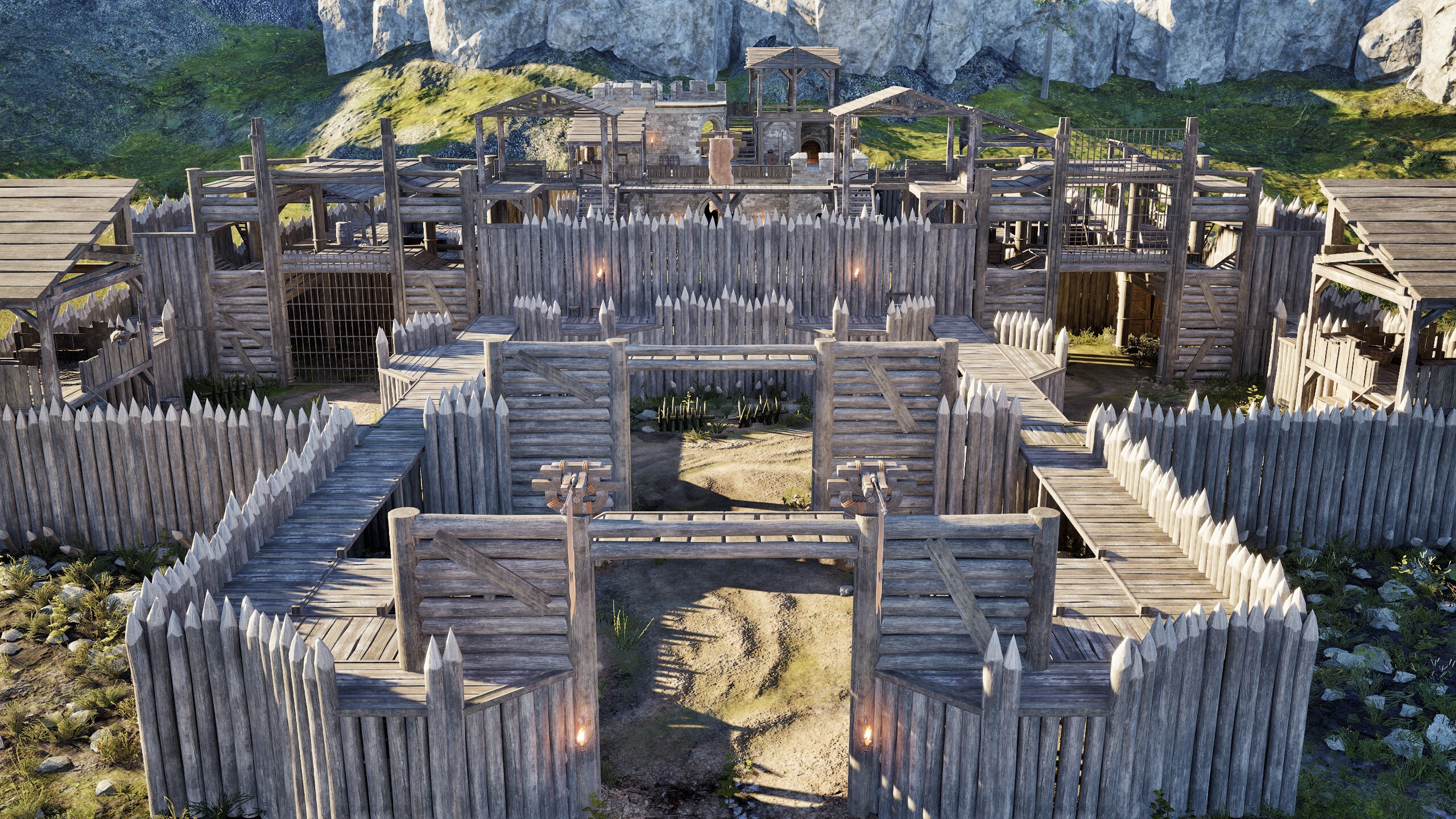
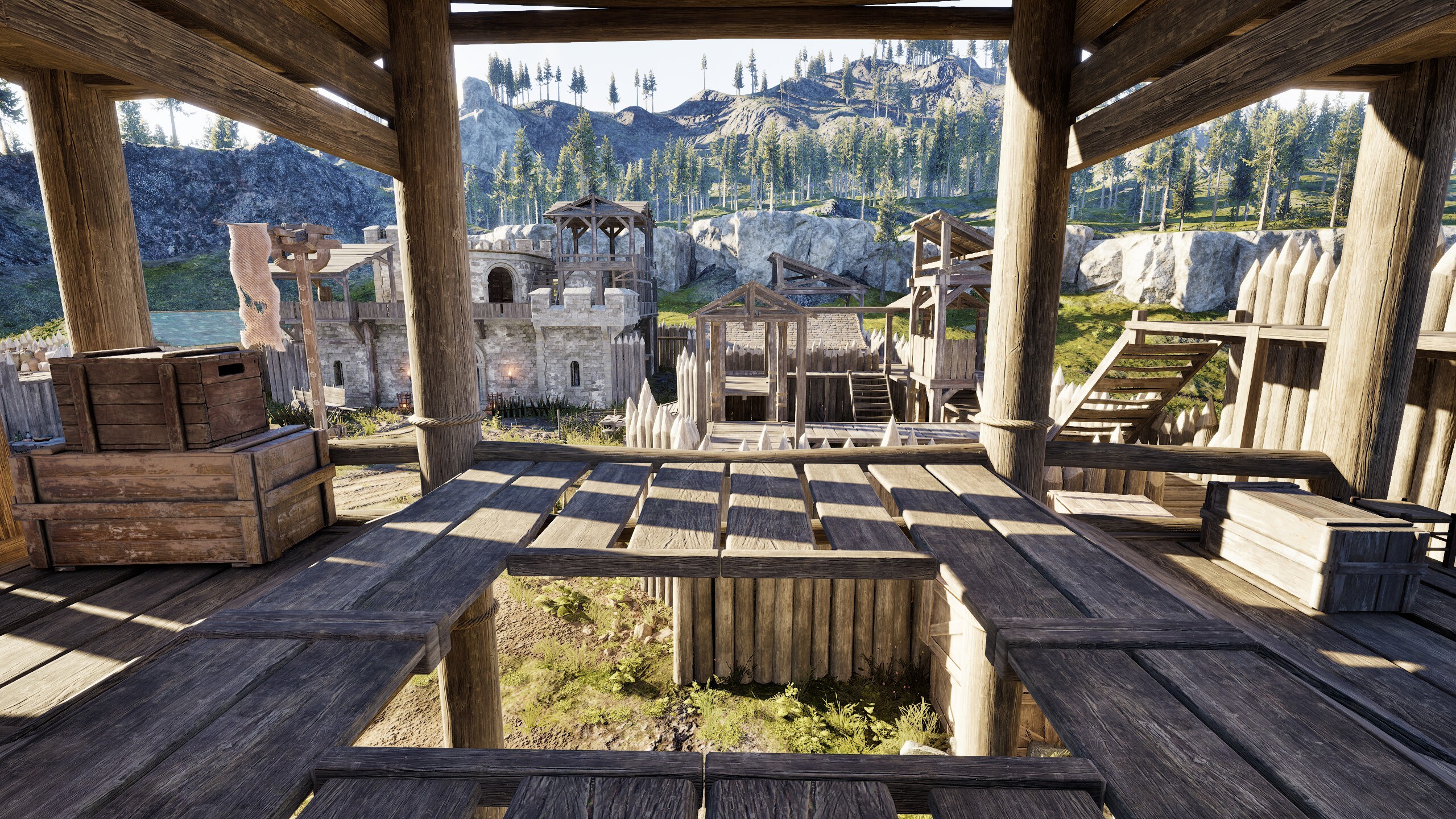 Each of the 31 Regions on Myrland contains its own Outpost, which is a fortified wooden structure belonging to the guild who currently owns the Region it is in.
- These Outposts are where the owners of the Region can withdraw any generated local resources, as well as store items in their unique Outpost Banker as well as use the Outpost Priest, which is currently planned to be set to guild use only, both of which will be locked behind a gate that only the Region owners can operate.
- Outposts are the location where Outpost Sieges happen, which are the events that determine who will be the new owner of a contested Region.
- Initiating a Region Claim and starting an Outpost Siege is done via the in-game map, by clicking on a Region and Contesting it. Contesting a Region will cost a decent amount of Prominence as well as some gold from your Guild Treasury.
- Doing the above will start a countdown timer until the Outpost Siege begins, which we are currently setting to 1 hour. At this point everyone who looks at the map can see that the Region is being Contested and can view the Outpost Siege countdown timer. A guild can only have one outgoing Region Claim at a time.
- There is a zone around every Outpost which disables murder counts while the Outpost Siege event is ongoing. [list]
- You will receive a [Game] message saying: “There is an ongoing Outpost Siege in this area, if you die here you will not be able to report others for murder.”
Outpost Sieges
After the cooldown timer has ended to initiate the Outpost Siege, the Outpost Siege event timer begins which currently lasts 1 hour, meaning the Attackers have one hour to complete all stages and successfully claim the region. Outpost Sieges are designed to allow you to engage with their mechanics without requiring you to bring any resources or specific items such as Siege Tents or Manganons. This means you will not need to build anything or traditionally siege anything once the event starts. The layout of the Outposts has also been designed to facilitate a variety of gameplay, with consideration for increased verticality and breaking lines of sight in certain areas. Outpost Sieges consist of three main stages. They are: [olist] [*] Break down the Outer Gate [*] Raise the Inner Gate [*] Raise your Guild Flag [/olist]Stage 1 – Breaking the Outer Gate
Once the event starts, three specialized structures will spawn outside the Outpost which produce Oil Pots automatically at a fixed rate of 1 every 30 seconds. These structures do not need to be built, do not require adding any materials and can not be destroyed during the Outpost Siege event.- [b]Note:[/b] We are very open to feedback here regarding if the Oil Pots should require a player interacting with the station to produce them or if they should be produced automatically as we currently plan to.
- Once enough oil pots have been piled up outside the gate (currently 20 pots), they will be ignited by fire, which will burn down the gate.
Stage 2 – Raising the Inner Gate
Once the outer gate has been opened, the Attackers will then gain access to the area inside the outer gate as well as the first floor platform on the outside walls of the Outpost. The Defenders maintain access to the inner second floor wall platforms, however are able to drop down if they wish to fight the Attackers attempting to open the gates. The Attackers must then open one or both of the two Inner Gates by operating a mechanism such as turning a wheel. While the defenders try to stop them.- Each gate has a wheel next to it, which when turned on will cause the gate to slowly rise, and when turned off will cause the gate to slowly lower. You do not need to stay next to the gate mechanism after interacting with it to turn it on or off, it will continue to raise or lower on its own unless toggled the other way by a member of the other team.
- It currently takes 10 minutes for a gate to rise from 0% to 100% if uninterrupted.
- If either gate is raised to 100%, the Attackers then gain access to the Inner Yard of the Outpost where the “King of the Hill” flag raising mechanic is played.
Stage 3 – Raising your Guild Flag
- A flag in the middle of the inner yard raises and lowers based on who from the attacking and defending guild is standing within its area.
- If only the Attackers are standing in the flag area then the attackers will gain points.
- If only the Defenders are standing in the flag area then the defenders will gain points.
- If the flag reaches 100% for the Attackers, they win the Outpost Siege event and are the new owners of the Region.
- If the Defenders manage to stop the attackers from raising their flag to 100% before the Outpost Siege event timer ends, the Defenders win and remain as the owners of the Region.
- If one member of both the Attackers and Defenders are present in the flag’s area, the flag will not move. Either group must push out or kill the remaining members of the opposite side in order for the flag to tick up in their favor.
- The flag will change to show the Heraldry design of guild with positive points, so as the attackers stand around the flag the following will happen: [list]
- Initially the flag will show the Defender’s Heraldry on it
- The Attackers occupy the flag area and the flag will slowly lower to the bottom of the flagpole.
- After the flag reaches the bottom of the flagpole, the flag will change visibly to the Attacker’s Heraldry, and begin to slowly rise to the top.
- Meaning 7.5 minutes to lower it to the bottom, then 7.5 minutes to raise it back up with your guild’s flag on it.
- If the Outpost Siege event timer ends but the flag is still being contested by the attackers, it will enter an overtime state where the attackers can continue to gain points, however the moment they step out of the area they will lose and the event will end.
After an Outpost Siege
- After an Outpost Siege event has ended, that Region can not be contested again by anyone for 2 hours. This number will very likely need to be adjusted based on playtesting and feedback during the PTR.
- The initiation and outcome of every Outpost Siege event will be broadcasted via a new chat channel, for example: [list]
- “HedgeKnights has contested StoneMen’s claim on the Meduli Badlands!”
- “The battle for Meduli Badlands has ended, StoneMen were victorious in their defence!”
- “The battle for Bullhead Gulch has ended, Gorehammers now rule over the land!”