We've Revamped the Apocalypse System!
Our apocalypse system is undergoing a major overhaul to offer a more modular and customizable experience. [url=https://store.steampowered.com/news/app/1105670/view/4354502761450308305]We asked you last summer[/url] to tell us which improvements were most important to you. What stood out was the need for personalization, with the possibility of modifiers that would have a greater impact on gameplay and change your habits and strategy. You can now fine-tune the difficulty to match your playstyle (and maybe discover new playstyles). [b]Key Changes:[/b]- Modular Difficulty Customization: The new system allows you to tailor the apocalypse level on any map, providing a personalized challenge. No more one-size-fits-all—adjust the difficulty as you see fit!
- Progressive Apocalypse Modifiers Unlocking: Previously, you had to complete one apocalypse to unlock the next. Now, affixes unlock progressively as you conquer maps with sufficiently high apocalypse levels. This step-by-step approach ensures a smoother progression and rewards your achievements at every stage.
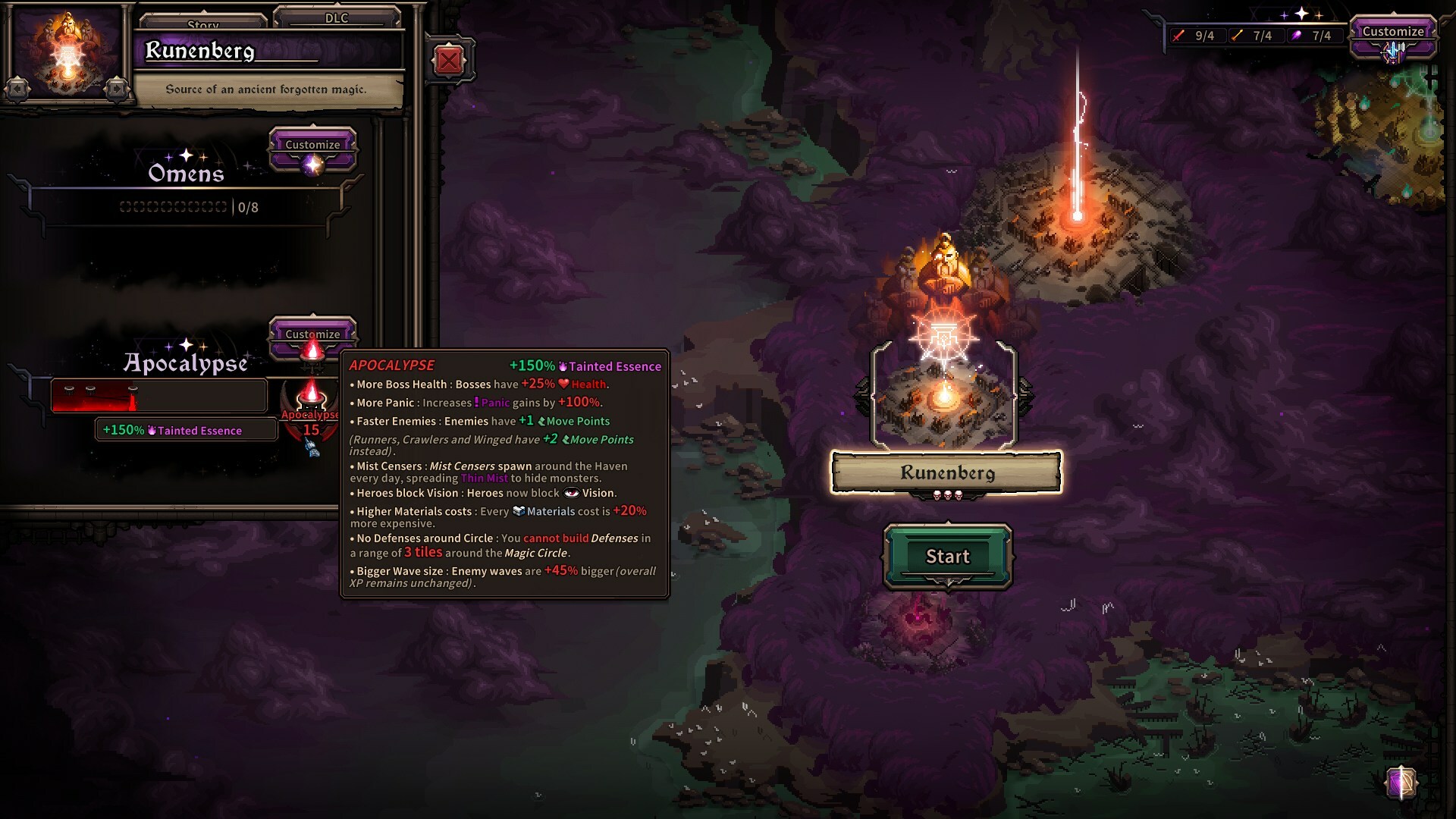 Yep, that's "Apocalypse 15". You should have fun with that one!
[b]Goals of the New System:[/b]
Yep, that's "Apocalypse 15". You should have fun with that one!
[b]Goals of the New System:[/b]
- Tailored Challenges: Our aim is to help you find the perfect difficulty setting for any map. The modular design also allows us to introduce new levels and modifiers over time, keeping the experience fresh and engaging.
- Beta Feedback: This beta phase will help us gather valuable insights on how you interact with the new system. We want to understand the challenges you face and ensure the tier unlocking speed meets your expectations.
- Increase enemy Health: Enemies have +15/30/45% Health.
- Higher Building costs: Buildings cost +12/24/36% Gold.
- Less starting Mages: The Magic Circle starts with 75% Health remaining.
- Increase Boss HP: Bosses have +100/200/300% Health.
- More Panic: Increases Panic gains by +100%.
- Negative Affixes: Items can have negative stat gains.
- Increase Wave size: Enemy waves have 15/30/45% more enemies.
- No Defenses around Circle: You cannot build defenses in a range of 3 around the magic circle.
- Higher Defenses costs: Defenses cost +20/40/60% Materials.
- Faster Enemies: Enemies have +1 Movement Points (Runners, Crawlers, and Winged have +2 instead).
- Mist Censers: Mist Censers appear, spreading Thin Mist in the battlefield.
- Heroes Block Vision: Heroes now block vision.
- Building Deadzone: You cannot place buildings in a range of 2 tiles around [Houses]/[Houses, Production Buildings, and Mines]/[each other], instead of 1.
- Start with only 1 Hero: Start with -2 heroes. Doesn't impact hero max capacity.
- Closer Fog: The fog starts closer to the Haven.
- Super Elite Affixes: Elites can have upgraded bonuses.
- Upgraded Enemies: All standard enemies have one of their Skills upgraded.
Known issues
- "No defenses around Circle": It's currently possible to build Teleporters and watchtowers in the exclusion area while it shouldn't be possible
[u][b] Important note: This is an [b]EARLY BETA[/b] of the new Apocalypse system. This means that the UI and the feedbacks are NOT final, and there's NO controller support for the Beta.[/b][/u]
How to access the Beta branch?
- Go to your Steam game library.
- Right click on The Last Spell and click "properties".
- Select the tab "Betas".
- Copy/paste this code in Betas to get access to the DLC branch: ApocalypseRework
- In the first dropdown box select "Beta".
- Click close and wait for the upload to finish downloading.
- Start playing.
About the saves
The saves for this Beta will be different than the saves for the main branch. This means that you won't have any risk of losing your current save while changing branch. To play the Beta with saves, you have two ways: [b][u]IF YOU WANT TO USE A PRE-MADE SAVE:[/u][/b]- Go to your Steam game library
- Right click on The Last Spell and click on "Local Files"
- There's a folder called "Saves for apocalypse open beta"
- Inside it, there are 2 archives: SaveAllMetaAllApoc and SaveAllMetaNoApoc
- Now, in another window, head over to %Appdata%/../LocalLow/Ishtar Games/The Last Spell/Save/Steam/[YOURSTEAMID]/Profile 1
- Open the SaveAllMetaAllApoc archive, open the "Profile 1" folder, and copy the "AppSaveBeta.bin" file in your own "Profile 1" folder in %Appdata%/../LocalLow/Ishtar Games/The Last Spell/Save/Steam/[YOURSTEAMID]/Profile 1
- Do the same for SaveAllMetaNoApoc with your "Profile 2" folder.
- In your local files, head over to %Appdata%/../LocalLow/Ishtar Games/The Last Spell/Save/Steam/[YOURSTEAMID]/
- Go to the profile you want to use
- Duplicate the "AppSave.bin", and rename the new file to "AppSaveBeta.bin"