- Fixed a save corruption happening when loading a run with a hero that had the [b]"Back Protection"[/b] Perk
- Deactivate your Steam Cloud for The Last Spell: right click on the game, Properties, General
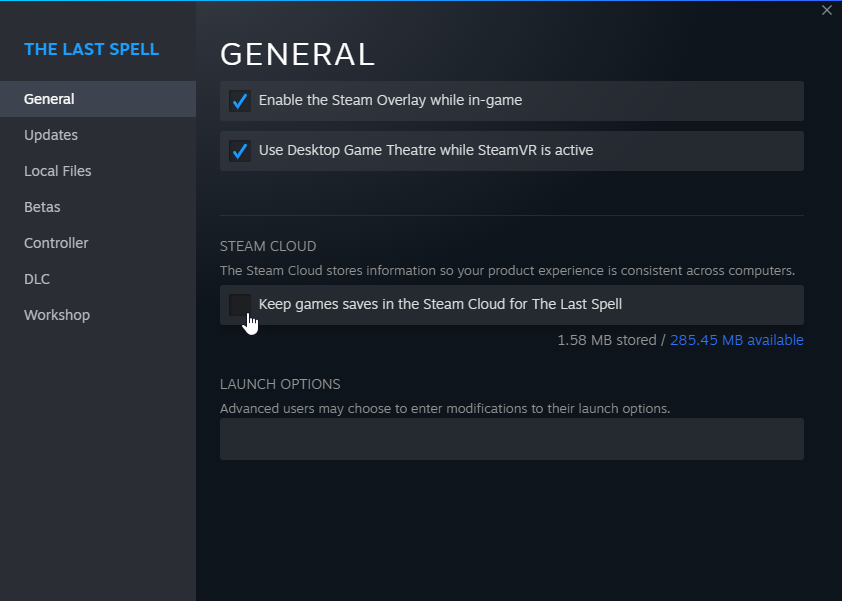
- Go to [b]%Appdata%/../LocalLow/Ishtar Games/The Last Spell/Save/Steam[/b] (copy/paste this path on the file explorer)
- Open folder named with your steam ID (a sequence of numbers)
- Open [b]"Profile1"[/b]
- Open [b]"Broken"[/b]: this folder contains your corrupted saves
- Copy the Save named [b]"GameSave__date"[/b] with the most recent date
- Open folder [b]"Profile1"[/b]
- Paste the file here and rename it [b]"GameSave"[/b]
- Launch your game & Continue your run
- Save & close The Last Spell
- Reactivate Steam Cloud
- If by relaunching The Last Spell, Steam ask you to choose between Local or Cloud Save: choose [b]Local[/b]