Hello. This is Victoria, and today I will be covering the new script features coming in 1.7.
Our scripting language is the basis of all of the ingame content in Victoria 3. This means that every script functionality that we use in making game content is also usable by modders. As well as triggers and effects which interface with new features such as power blocs and building ownership, 1.7 and Sphere of Influence add several novel functionalities for modders. These include our new scripted progress bar system for journal entries.
Hello. This is Victoria, and today I will be covering the new script features coming in 1.7.
Our scripting language is the basis of all of the ingame content in Victoria 3. This means that every script functionality that we use in making game content is also usable by modders. As well as triggers and effects which interface with new features such as power blocs and building ownership, 1.7 and Sphere of Influence add several novel functionalities for modders. These include our new scripted progress bar system for journal entries.
Scripted Progress Bars
In 1.7, journal entries will have a new way to display data: scripted progress bars. Multiple progress bars can be added per journal entry, and progress bars can be shared between journal entries. Scripted progress bars can also be configured to automatically increment on weekly, monthly, and yearly ticks.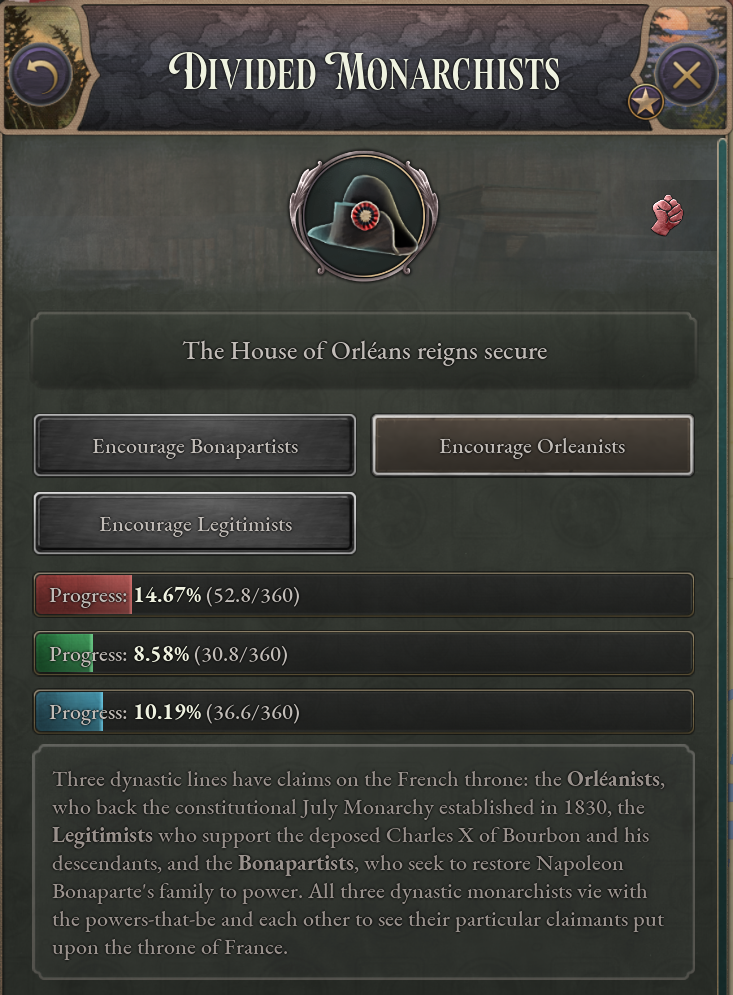 Previously, all journal entries with progress bars have worked off of a “goal” system, where the journal entry is tied to a variable, and incrementing this variable causes the journal entry to progress.
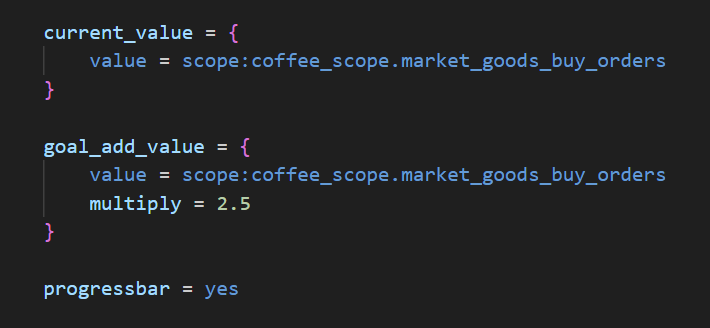
[i]Pictured: When this journal entry is initialised, it gets the current amount of coffee buy orders in one’s market, and multiplies it by 2.5. That multiplied value is the “goal”, and the current value is always equivalent to the current amount of coffee buy orders in the market.[/i]
Previously, all journal entries with progress bars have worked off of a “goal” system, where the journal entry is tied to a variable, and incrementing this variable causes the journal entry to progress.
[i]Pictured: When this journal entry is initialised, it gets the current amount of coffee buy orders in one’s market, and multiplies it by 2.5. That multiplied value is the “goal”, and the current value is always equivalent to the current amount of coffee buy orders in the market.[/i]
 This previous system remains available, and all journal entries utilising it will stay functional. However, the scripted progress bar system permits for new and interesting use cases, such as better support for incrementing progress based on various conditions.
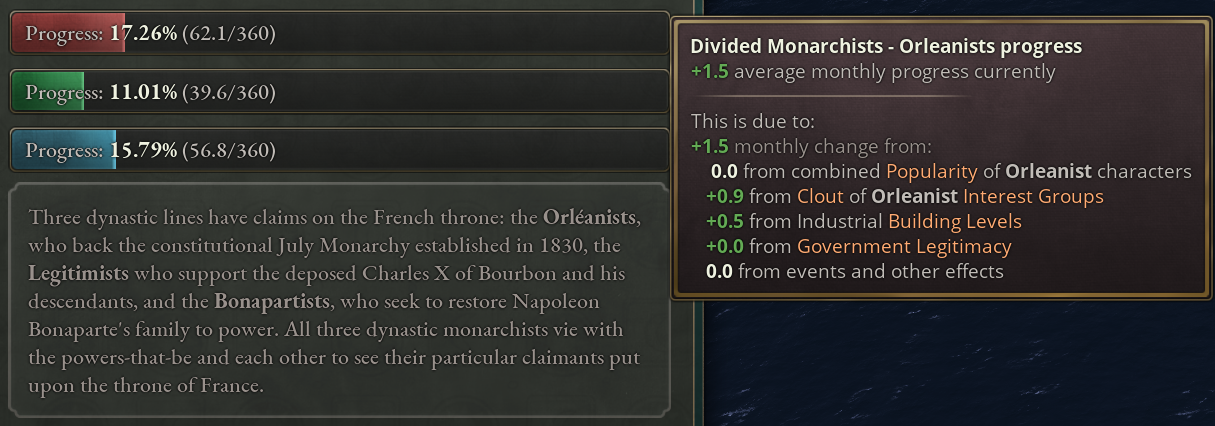
Each scripted progress bar has certain conditions which can change its progress on a weekly, monthly, or yearly basis, and can be changed by means of scripted effect, using the new “add_progress” and “set_bar_progress” effects.
This previous system remains available, and all journal entries utilising it will stay functional. However, the scripted progress bar system permits for new and interesting use cases, such as better support for incrementing progress based on various conditions.
Each scripted progress bar has certain conditions which can change its progress on a weekly, monthly, or yearly basis, and can be changed by means of scripted effect, using the new “add_progress” and “set_bar_progress” effects.
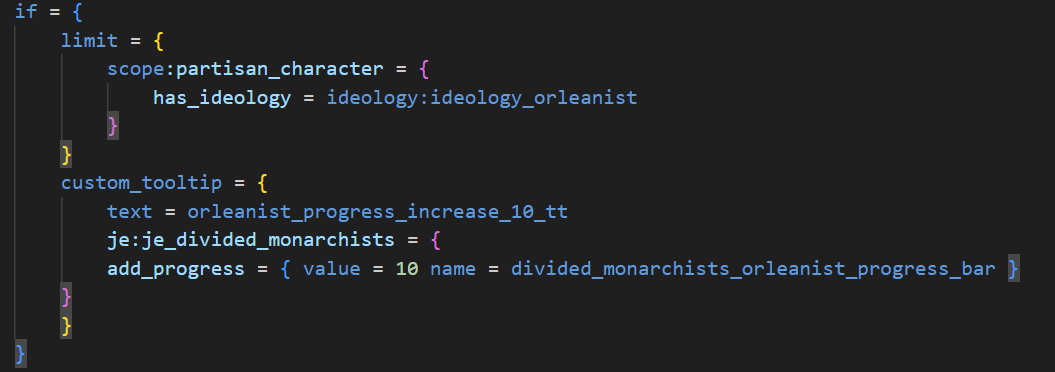
 [i]Pictured: The add_progress effect. This is used in a journal entry scope.[/i]
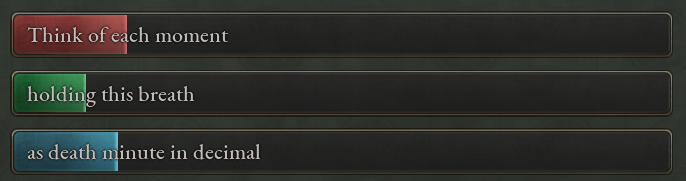
 Scripted progress bars also have loc support, allowing for printing whatever text one wants on them.
[i]Pictured: Think of these thoughts as limitless light; exposing closing circuitry of fright;[/i]
Scripted progress bars also have loc support, allowing for printing whatever text one wants on them.
[i]Pictured: Think of these thoughts as limitless light; exposing closing circuitry of fright;[/i]
 Scripted progress bars are defined in the common/scripted_progress_bars folder, in files therein. Looking inside one of these files, one can see the structure of each progress bar in script.
 Going line by line, the first thing one sees is the ID of the progress bar. This is used in the journal entry that the progress bar is connected to. Note that progress bars can be connected to multiple journal entries at once.

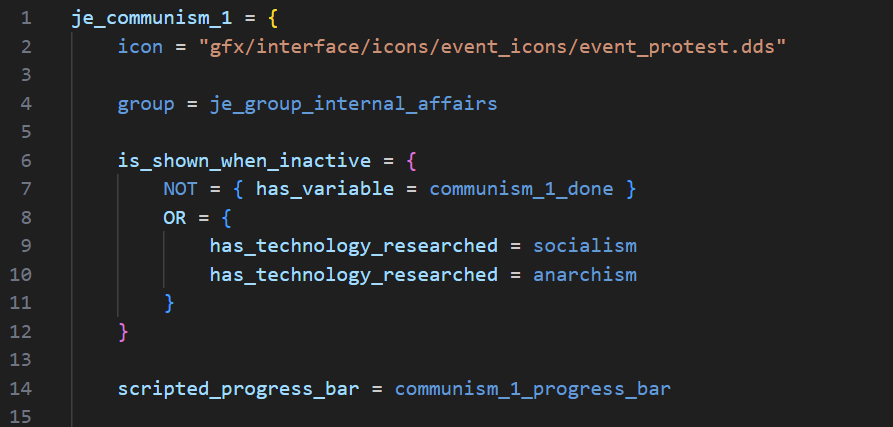 Next is the localisation for the progress bar. The desc is the text displayed on the bar itself, and the name is displayed in the tooltip when one mouses over the bar.
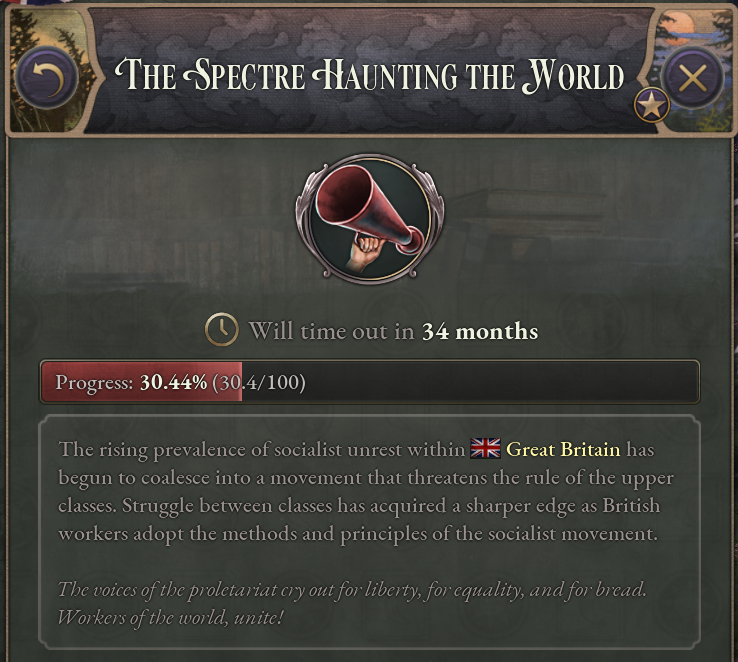
 Next is the skin the progressbar uses.
 This is the communism progress bar, and so it uses the colour red. This is what it looks like ingame.
 A complete list of available progress bar skins follows:
- double_sided_gold
- default_green
- default_bad
- default
- double_sided_bad
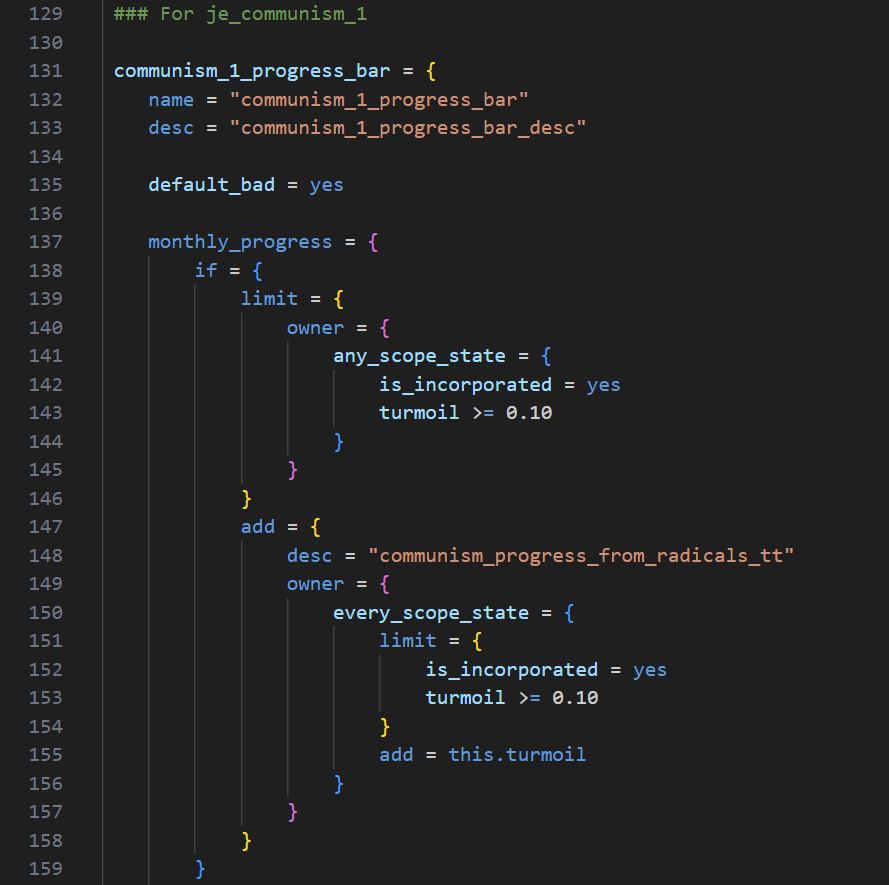
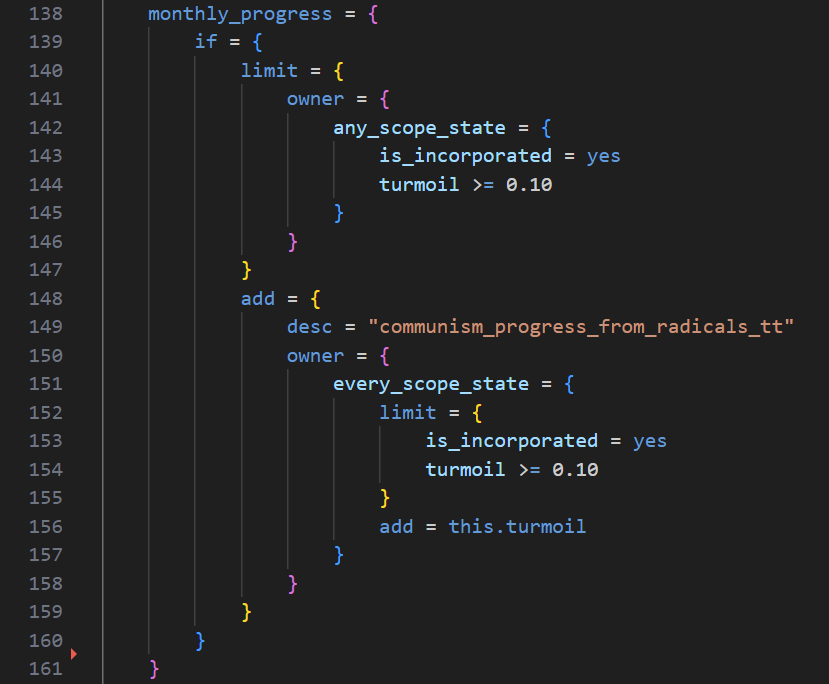
 Going back to the internals of the progress bar script, one now sees the conditions scripted in the progress bar. These are what makes it trend in one direction or the other over the course of various increments.
[i]Pictured: If one’s country has any incorporated state with over 10% of the population as radicals, every incorporated state in the country with over 10% radicals will contribute their radical count to the progress of the journal entry.[/i]
Going back to the internals of the progress bar script, one now sees the conditions scripted in the progress bar. These are what makes it trend in one direction or the other over the course of various increments.
[i]Pictured: If one’s country has any incorporated state with over 10% of the population as radicals, every incorporated state in the country with over 10% radicals will contribute their radical count to the progress of the journal entry.[/i]
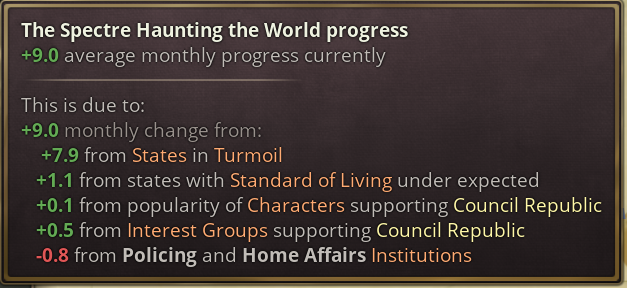
 For the purpose of this example, all that matters is the amount of radicals in one’s country. In practice, a progress bar can have however many factors behind it as one wants, and all of them will be printed in a nice and orderly list.
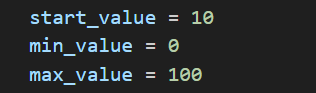
 Lastly, there is the start_value, the min_value, and the max_value. These values define the bounds of the progress bar - its minimum bound, its maximum bound, and what value it will start with when the journal entry is initialised.
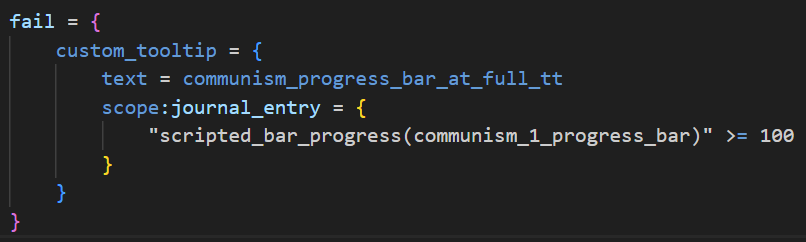
 The value of a progress bar can be retrieved, compared, and used in variable math with the scripted_bar_progress trigger in a journal entry scope.

Miscellaneous Script Features
Diplomatic Pact Modifiers
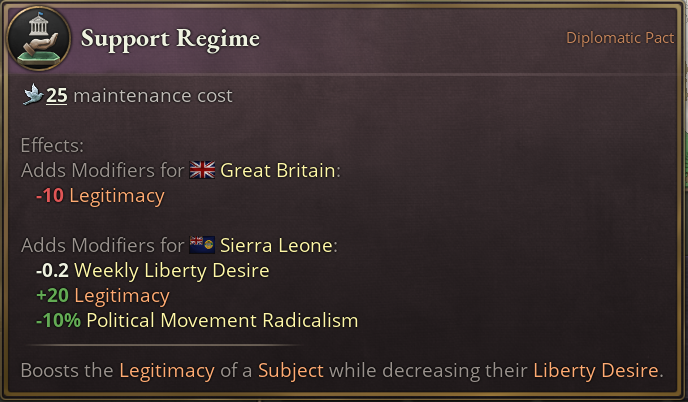
Diplomatic pacts can now apply modifiers to both involved parties. These are controlled by the first_modifier and second_modifier fields in the diplomatic pact’s script–the first_modifier applies to the initiator, and the second_modifier applies to the other country. For example, the Support Regime subject interaction gives the subject in question lowered radicalism, and less liberty desire, at the cost of some legitimacy for yourself.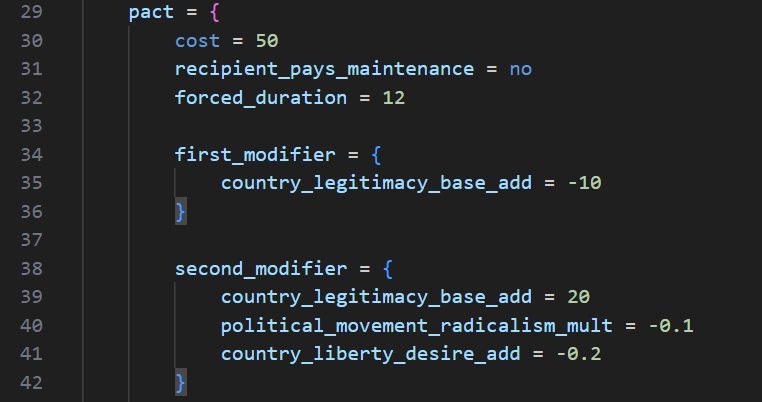 Here is how this script looks ingame.
[i]Pictured: I love the Regime.[/i]
Here is how this script looks ingame.
[i]Pictured: I love the Regime.[/i]
Diplomatic Interaction Types
Diplomatic interactions now have types.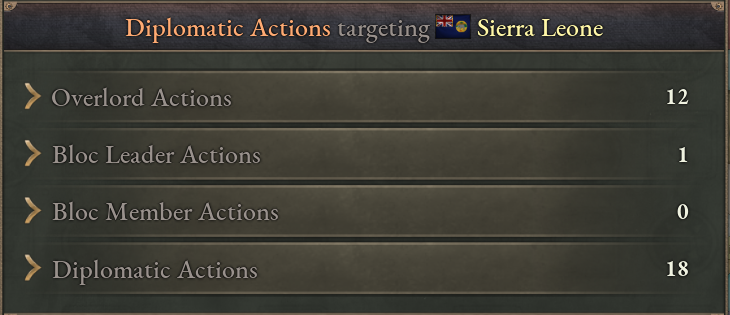 The type of a diplomatic action determines from where it can be accessed. Current diplomatic action types are as follows:
- general
- subject
- overlord
- power_bloc_leader
- power_bloc_member
New Script Support
In addition to a selection of triggers, modifiers, and effects related to new features, several new and useful triggers for pre-existing game content have been added in 1.7. These include: Triggers:- [b]country_innovation[/b] - compares against the total innovation produced by a country
- [b]gdp_per_capita_ranking[/b] - compares against a list of all countries’ GDP/c stats. Note that in this case, lower is better, as the top GDP/c ranking is 1.
- [b]sol_ranking[/b] - compares against a list of all countries’ Standard of Living stats.
- [b]income_transfer[/b] - compares against the income transferred by a diplomatic pact.
- [b]potential_diplomatic_play_power_ratio[/b] - compares against the expected power ratio in a diplomatic play between two countries.
- [b]can_add_wargoal_against[/b] - evaluates true if a country can add a wargoal against a specified country.
- [b]can_break_diplomatic_pact[/b] - evaluates true if a country can break a specified diplomatic pact with a specified country.
- [b]can_create_diplomatic_pact[/b] - evaluates true if a country can create a specified diplomatic pact with a specified country.
- [b]would_accept_diplomatic_action[/b] - evaluates true if a specified country would accept a request for a specified diplomatic pact.
- [b]progressiveness[/b] - compares against the progressiveness of a given law type.
- [b]law_progressiveness_difference[/b] - compares the progressiveness of two law types.
- journal_entry_age - compares against the time since a journal entry was activated, in days.
- [b]enactment_chance_for_law[/b] - compares against the enactment chance for a law type, if it were to begin enactment immediately.
- [b]can_trigger_event[/b] - takes an event ID, returns true if the event is currently fulfilling its trigger conditions.
- [b]economic_dependence[/b] - compares against one country’s economic dependence on the another country.
- [b]gdp_ownership_ratio[/b] - compares against the percentage of one country’s economy that is owned by another country.
- [b]allow_trade_routes_without_interest_bool[/b] - Boolean modifier that, when set to true, enables a country to establish trade routes with countries that it does not have an interest in.
- [b]state_migration_quota_mult[/b] - increases or decreases the amount of people migrating to a given state.
- [b]country_overlord_income_transfer_mult[/b] - increases or decreases the amount of money that a subject pays to its overlord.
- [b]country_convoy_contribution_to_market_owner_add[/b] - increases or decreases the amount of convoys that a country contributes to its market.
- [b]country_cannot_cancel_law_enactment_bool[/b] - Boolean modifier that, when set to true, forbids a country from manually cancelling a law enactment.
- country_port_connection_cost_mult - increases or decreases the convoy cost of port connections.
- [b]tariff_[import/export]_outside_power_bloc_mult[/b] - increases or decreases tariffs for non-power-bloc members’ goods.
- [b]regime_change[/b] - immediately forces a Regime Change wargoal against the specified country, using the current country scope as a template.