[b]Whom will this affect?[/b]
Only relevant for mods that modify any of these camera settings files of the designers (game version 1.17.4), found in [b]hoi4/game/gfx/3dviewenv/[/b]:- equipment_editor_small_portrait.txt
- equipment_editor.txt
- plane_designer_3d_preview.txt
- tank_designer_3d_preview.txt
- template_editor.txt
- template_small_portrait.txt
[b]What if I don’t do anything?[/b]
Then the game will use the camera settings from native 1.17.5.0 rather than those in your mod.[b]How do I update?[/b]
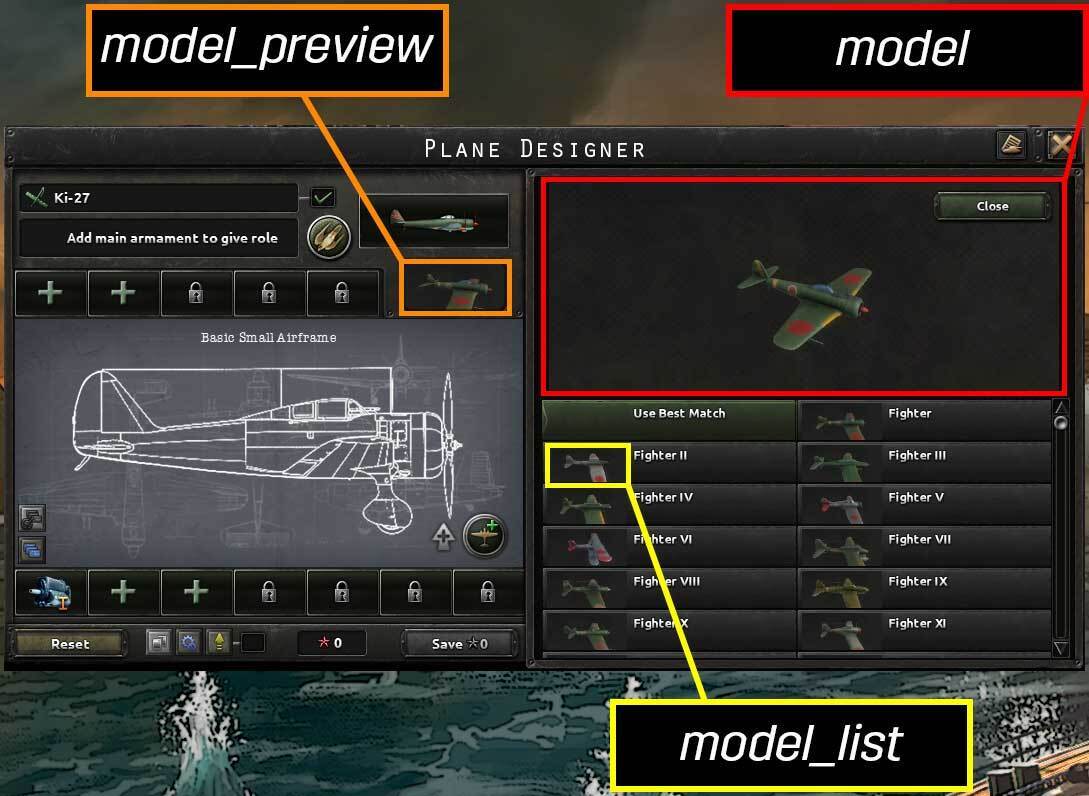
You will need to add your 3d model view camera settings to the new files in order to keep your mods 3d model view camera settings. The new files are located in [b]hoi4/game/gfx/3dviewenv/[/b] and are named as follows:- division_designer_model.txt
- division_designer_model_preview.txt
- division_designer_model_list.txt
- plane_designer_model.txt
- plane_designer_model_preview.txt
- plane_designer_model_list.txt
- ship_designer_model.txt
- ship_designer_model_preview.txt
- ship_designer_model_list.txt
- tank_designer_model.txt
- tank_designer_model_preview.txt
- tank_designer_model_list.txt