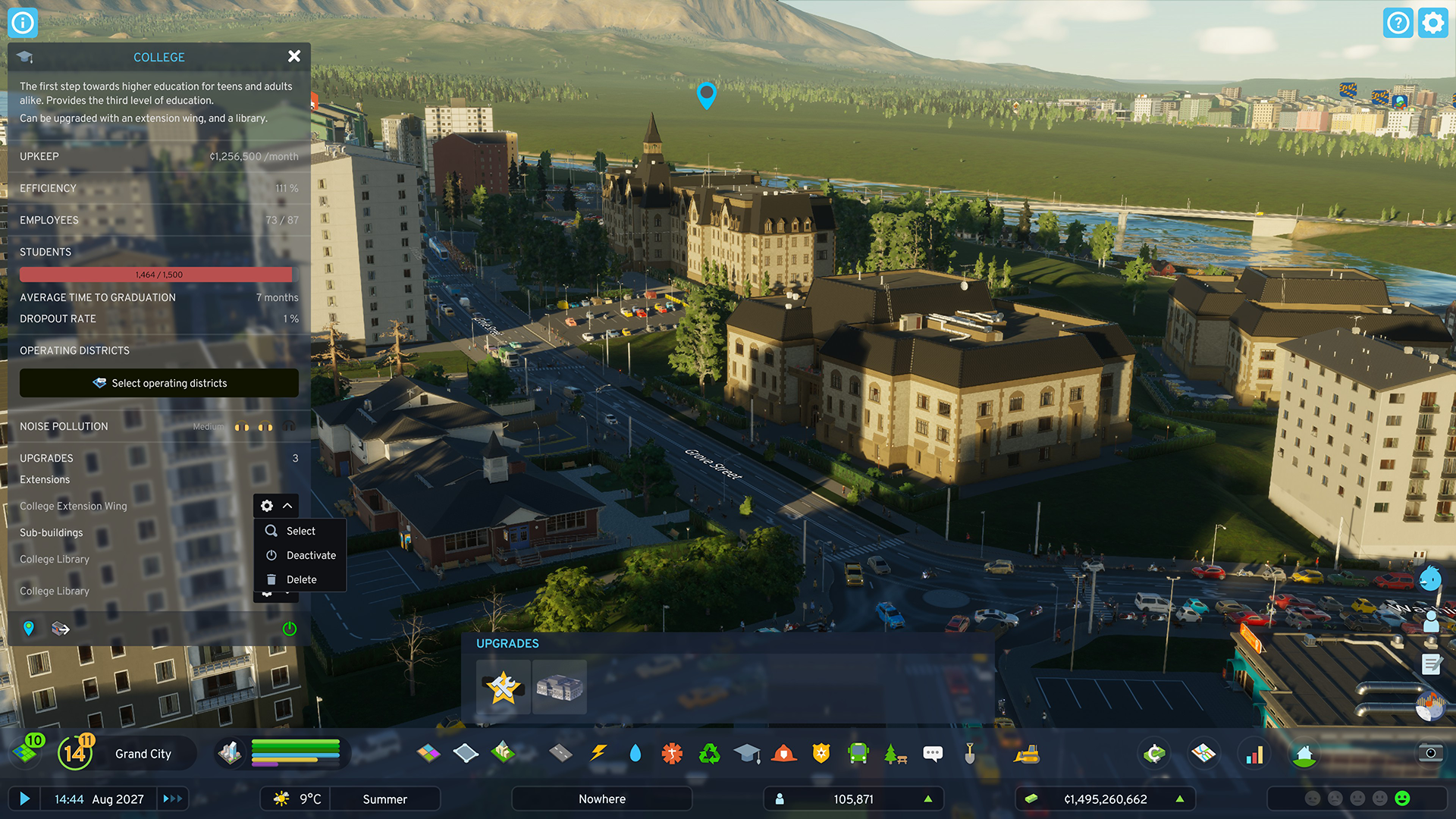
 [i]Deactivate or delete Extensions or relocate Sub-buildings through the Selected Info Panel[/i]
For sub-buildings, there’s even more control. They can also be removed using the bulldozer, you can pick them up and move them, or turn them on and off as needed. Moving them is particularly handy now as they don’t have to be placed in connection to the main building. As long as they are within the predefined radius and have pedestrian and/or road access, they will work like before. Sub-buildings like the Elementary School Playground just need a pedestrian path connecting them to the rest of the city, while sub-buildings like the Bus Depot Extra Garage will need road access to function. We’re excited to see how you take advantage of this new freedom in your cities, so don’t hesitate to tag us on social media if you’re showing off screenshots.
[i]Deactivate or delete Extensions or relocate Sub-buildings through the Selected Info Panel[/i]
For sub-buildings, there’s even more control. They can also be removed using the bulldozer, you can pick them up and move them, or turn them on and off as needed. Moving them is particularly handy now as they don’t have to be placed in connection to the main building. As long as they are within the predefined radius and have pedestrian and/or road access, they will work like before. Sub-buildings like the Elementary School Playground just need a pedestrian path connecting them to the rest of the city, while sub-buildings like the Bus Depot Extra Garage will need road access to function. We’re excited to see how you take advantage of this new freedom in your cities, so don’t hesitate to tag us on social media if you’re showing off screenshots.
EXISTING CITIES
Now you might wonder how all of this affects your existing cities, so let’s get the most obvious question out of the way first. Saves from before the economy rework still work, though we expect they will have a transition period as the simulation adapts to the changes. When it comes to modded saves, we can’t make any guarantees, but keep an eye out for updates or instructions from the modders. Mods that affect the simulation are likely to be affected by the update. When you load up your city (and unpause) there are a few things you should keep in mind. With [b]Government Subsidies removed[/b] and [b]City Service upkeep increased[/b], the cost of running your city just increased. If your city relies on ambulances, hearses, fire engines, police cars, and garbage trucks coming from Outside Connection, make sure to enable the [b]Import City Services policy[/b] in the City Information panel, but don’t forget that your neighbors charge a fee to help you out. All this is expected to create a negative money trend, but depending on your city’s finances, your tax income might be enough to offset the new costs once the calculations catch up. If you’re struggling for money, don’t forget that you can increase taxes, reduce service budgets, or temporarily turn buildings off to save on their upkeep cost. [b]Demand[/b] adjusts quite quickly, so don’t be alarmed if some of your demand bars empty or fill up when you start playing. With the increase in industrial manufacturing space, your industry will be on a hiring spree that’s likely to drive up your residential demand - unless your city has workers already looking for a job. We recommend giving it some time though as companies (commercial, industrial, and office) readjust their production and employee numbers to be profitable, which we expect will overall lead to an [b]increase in unemployment[/b] in your city. With the new calculations for residential density demand, your citizens may also start looking for different types of housing or move around the city. Thankfully, the new calculations for rent and resource consumption should help them afford the type of housing they prefer, and we expect most (if not all) of your [b]“High Rent” notifications will disappear[/b] after letting the simulation run for a while. If you keep seeing these or they start to come back, then make sure to check your unemployment and provide citizens with jobs so that they can pay their rent. With time and some tweaks, your existing cities should adjust to the changes, so you can get back to realizing their full potential. And as always, don’t hesitate to ask for help if you encounter any situations you’re unsure of how to handle and report any bugs you might run into [url=https://forum.paradoxplaza.com/forum/forums/cities-skylines-2-bug-reports.1162/]here[/url]WHAT’S NEXT?
Before we finish for today, we’d like to share our plans going forward. We will of course follow discussions and read feedback you share as you play with these changes. We’ve done extensive testing to get the changes as balanced as possible, but we know that some tweaking will likely still be necessary once you all start sharing your experiences. We’ve already started work on the next major patch which we hope to have ready for you in Q3, and we want to give you a little sneak peek at what you can expect. As previously mentioned, we want to expand the service import to bring you more control. We’re also looking at what we can improve in the UI and how the game relays information to you, so you have everything you need to solve issues in the game. We’d love to hear your thoughts on this topic. Are there any issues you’ve struggled to solve in your city? Any information you have been looking for but weren’t able to find? Last, but definitely not least, the art team has been cooking up some [b]new free buildings[/b] for you all. We appreciate each and every one of you for sticking with us and giving us a chance to make Cities: Skylines II what it can and should be. Your patience and support mean the world to us and we hope the new service buildings and vehicles can serve as a token of our appreciation. Thank you for being a part of our community! [i]A sneak peek at some of the new service buildings and vehicles you can look forward to[/i]