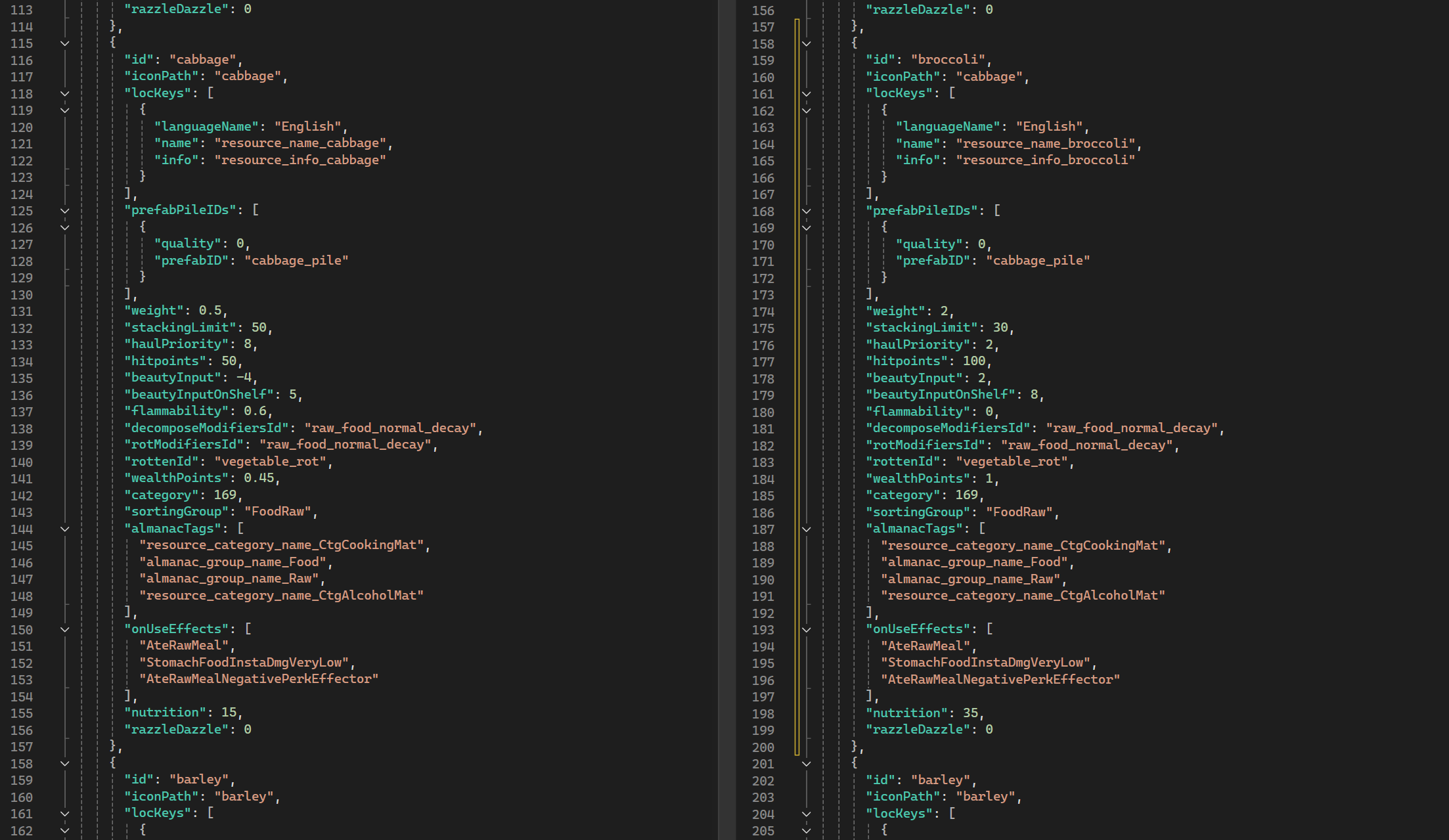
 Note that some of the names have to be added in other documents for this to work. So after all is set and done, you would have broccoli in the game… but it would look like cabbage.
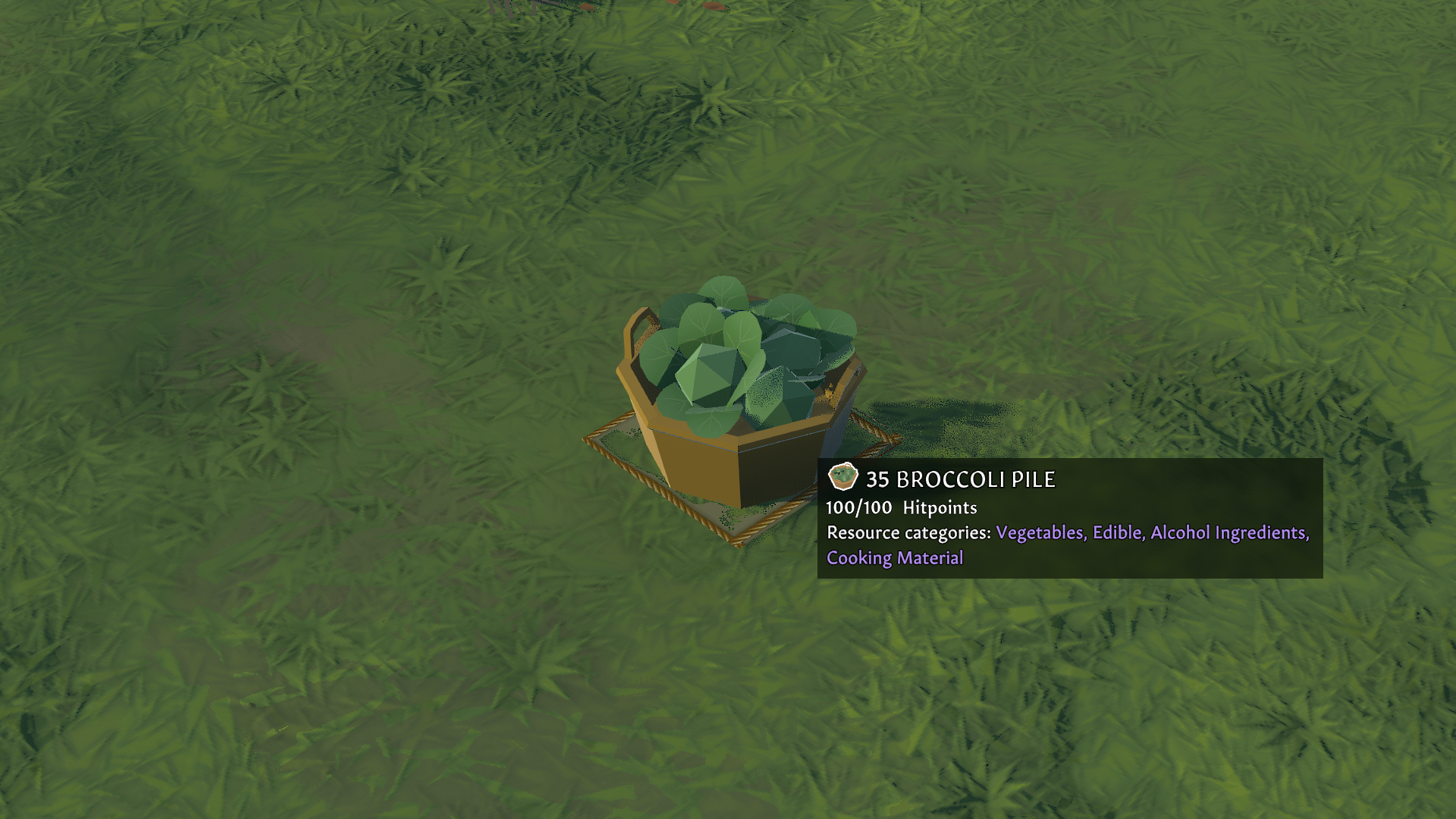 That is because the resource was using the same prefab, in this case “cabbage_pile”. Prefab (short for "prefabricated object") is a reusable asset that stores a game object along with its components, properties, and child objects. Prefabs allow us to create, modify, and instantiate complex objects efficiently without having to rebuild them from scratch every time.
With the new modding update, the data will look like this:
That is because the resource was using the same prefab, in this case “cabbage_pile”. Prefab (short for "prefabricated object") is a reusable asset that stores a game object along with its components, properties, and child objects. Prefabs allow us to create, modify, and instantiate complex objects efficiently without having to rebuild them from scratch every time.
With the new modding update, the data will look like this:
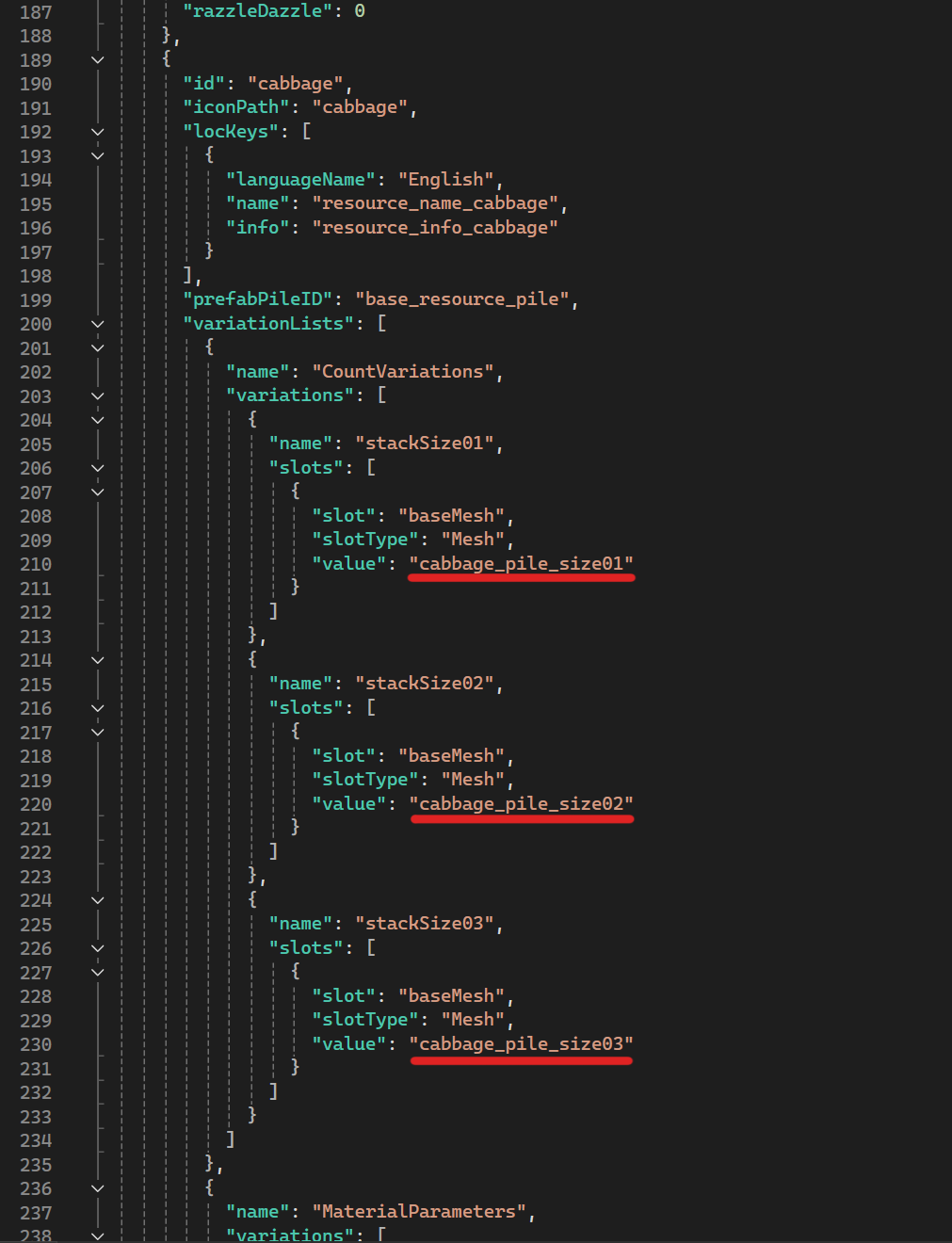 And will allow for mesh integration. A mesh is a 3D model composed of vertices, edges, and faces that define the shape of an object. Meshes are the fundamental building blocks for 3D assets in games, including characters, environments, weapons, and props.
This new approach will allow you to modify the game's object in different ways. You can either:[olist]
[*] Create new meshes (in a 3d program of your choice), export them and rename them as instances marked above and they’ll be swapped in-game.
[*] Create new meshes (in a 3d program of your choice), export them, name them as you want, and rename instances marked above and they’ll be swapped in-game.[/olist]
But there is more. Beneath that you will see Material Parameters section:
And will allow for mesh integration. A mesh is a 3D model composed of vertices, edges, and faces that define the shape of an object. Meshes are the fundamental building blocks for 3D assets in games, including characters, environments, weapons, and props.
This new approach will allow you to modify the game's object in different ways. You can either:[olist]
[*] Create new meshes (in a 3d program of your choice), export them and rename them as instances marked above and they’ll be swapped in-game.
[*] Create new meshes (in a 3d program of your choice), export them, name them as you want, and rename instances marked above and they’ll be swapped in-game.[/olist]
But there is more. Beneath that you will see Material Parameters section:
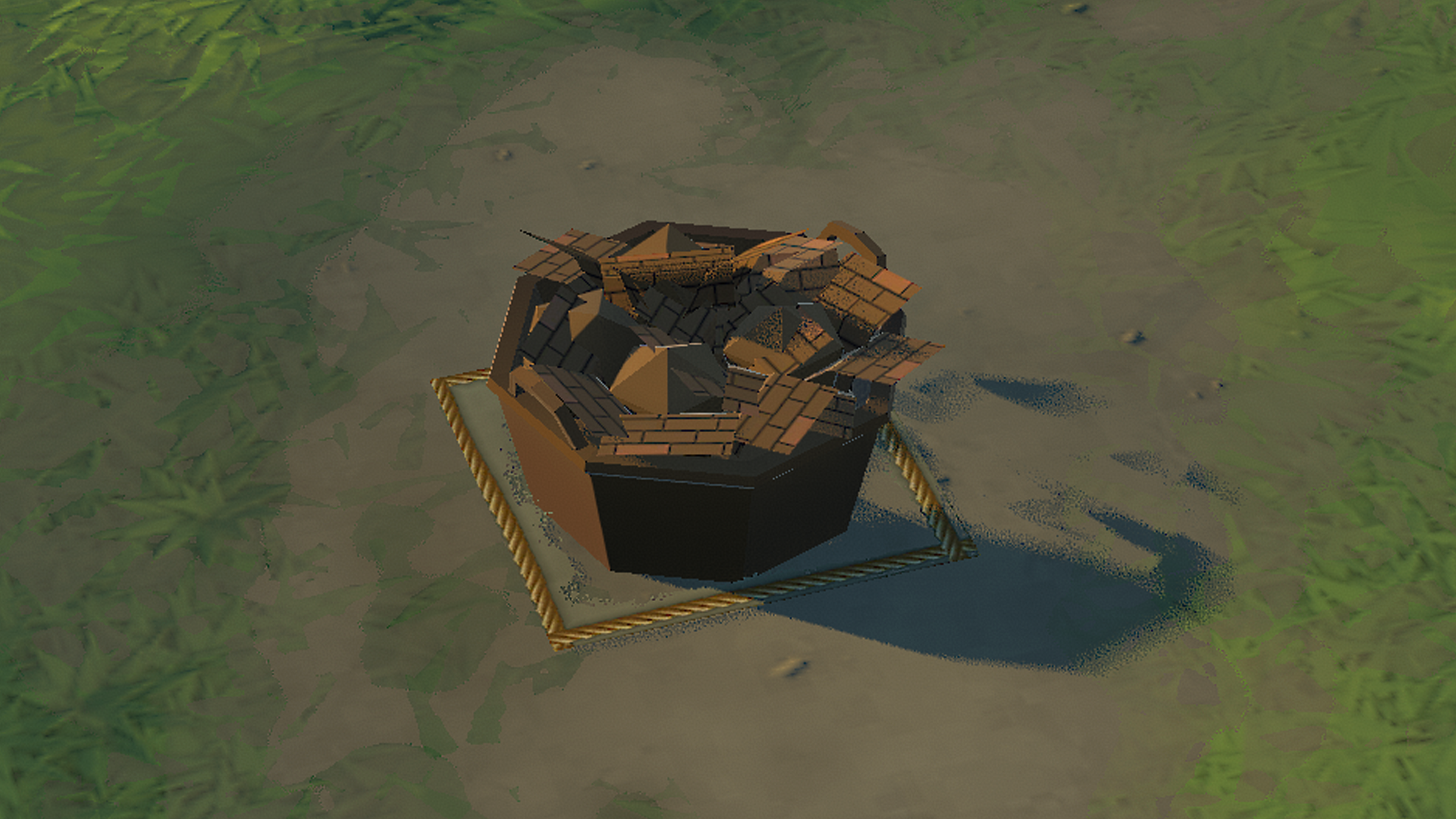
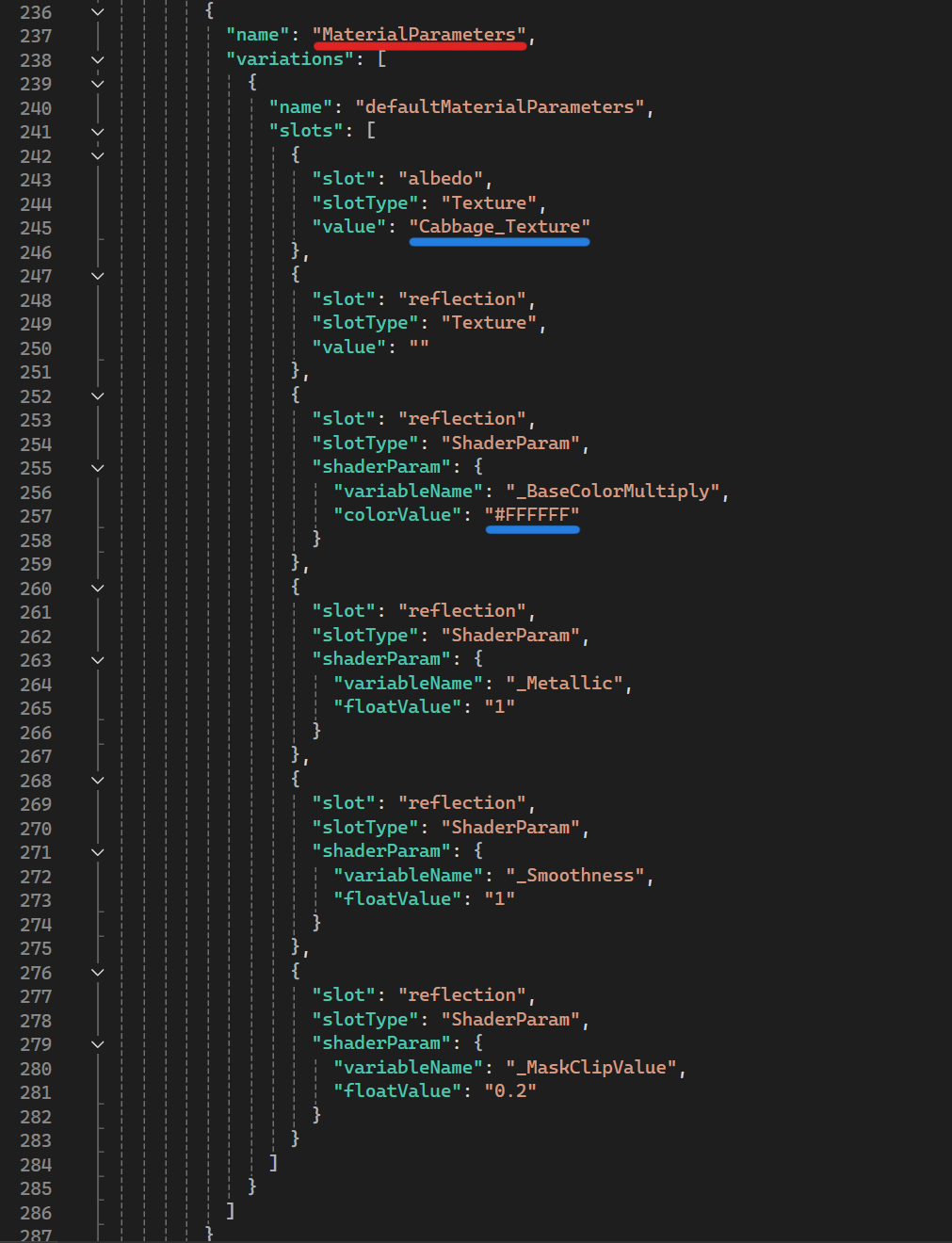 You will be able to change the texture of the existing object with a new one. Why not replace it with the existing one? How about some clay brick cabbage?
 Alternatively, you will be able to make a new texture, rename it into an existing one and put it here or name it as a new one and reference the new name in the code.
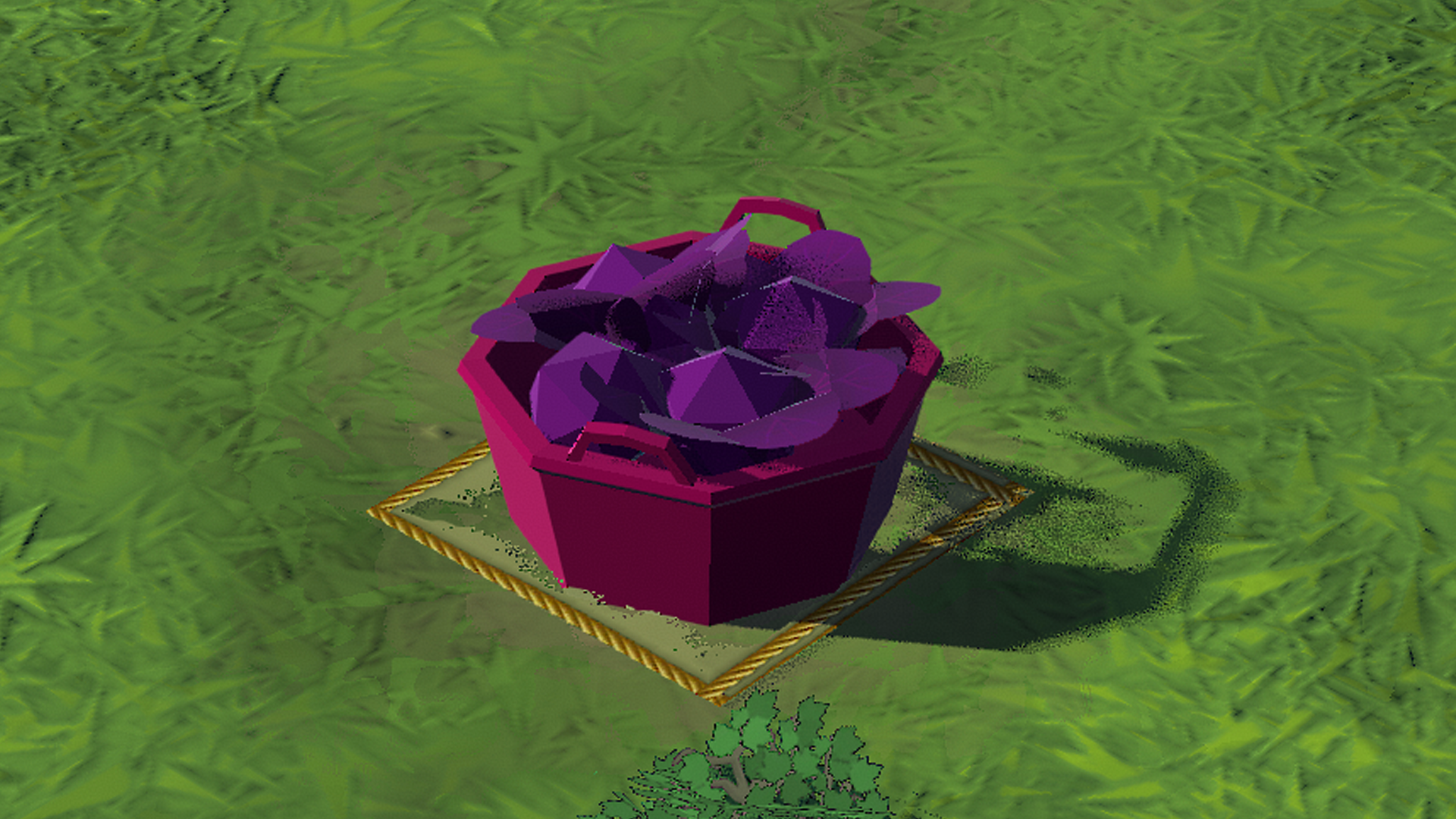
Or you can go brute-mode and use color overlay by changing the ColorValue parameter. Someone is certainly a fan of purple cabbages:
Alternatively, you will be able to make a new texture, rename it into an existing one and put it here or name it as a new one and reference the new name in the code.
Or you can go brute-mode and use color overlay by changing the ColorValue parameter. Someone is certainly a fan of purple cabbages:
 Resources, equipment, vegetation and even buildings will be customized by all of the stuff mentioned above. There are some constraints with the current system when it comes to buildings. For instance, you will be able to create a production building that is 5x5 in size, but some of those areas might not work as intended because such a building does not exist in the game. Nor will you be able to make a table that is larger than the current large table in game. It is possible, but some weird behavior can be expected in that case. Like, feast food and cloth would not occupy that “extra part” of the table nor would the table be selectable via that extra part. The buildings that you use as a foundation for your modeling and modding will have to retain some common things - like the location of the flame that appears during the production and standing spot for the settler during their work.
As long as you follow preexisting templates, you should be able to modify existing and add new stuff to your liking with the upcoming update. Once you make your meshes and/or textures, you will have to import them via a separate Unity project taken from our GitHub and use that project to build addressables. Addressables is a system used for efficient asset management, allowing developers to dynamically load and unload assets at runtime. It helps optimize memory usage, reduce build size, and improve performance, especially in large projects. That way, Going Medieval is able to load external meshes, textures and text mesh pro sprite assets. But more on that once the update goes live.
Want to be among the first modders that will be able to try this? Keep your eyes on the Modding branch. We’ll post a note when we push this update there.
[b]Switch to Modding branch on Steam.[/b] [Properties>Betas>Private Betas] The code is: [spoiler]DazzleBrokerColibri[/spoiler]
Once you have mod working locally you can put it on Workshop and update later on.
We’ll go into more detail once the update goes live and we’ll provide you with a proper guide for this type of modding. While you wait, let us know how this all sounds to you. Next MMT will be about those siege weapons we mentioned before. Until then…
Stay medieval!
[url=https://store.steampowered.com/developer/foxyvoxel][i][b]Foxy Voxel[/b][/i][/url]
[url=https://discord.gg/goingmedieval style=button]Discord[/url] [url=https://www.reddit.com/r/goingmedieval/ style=button]Reddit[/url] [url=https://x.com/going_medieval style=button]X/Twitter[/url] [url=https://bsky.app/profile/foxyvoxel.bsky.social style=button]Bluesky[/url] [url=https://www.tiktok.com/@going.medieval style=button]TikTok[/url] [url=https://www.facebook.com/FoxyVoxel style=button]Facebook[/url]
Resources, equipment, vegetation and even buildings will be customized by all of the stuff mentioned above. There are some constraints with the current system when it comes to buildings. For instance, you will be able to create a production building that is 5x5 in size, but some of those areas might not work as intended because such a building does not exist in the game. Nor will you be able to make a table that is larger than the current large table in game. It is possible, but some weird behavior can be expected in that case. Like, feast food and cloth would not occupy that “extra part” of the table nor would the table be selectable via that extra part. The buildings that you use as a foundation for your modeling and modding will have to retain some common things - like the location of the flame that appears during the production and standing spot for the settler during their work.
As long as you follow preexisting templates, you should be able to modify existing and add new stuff to your liking with the upcoming update. Once you make your meshes and/or textures, you will have to import them via a separate Unity project taken from our GitHub and use that project to build addressables. Addressables is a system used for efficient asset management, allowing developers to dynamically load and unload assets at runtime. It helps optimize memory usage, reduce build size, and improve performance, especially in large projects. That way, Going Medieval is able to load external meshes, textures and text mesh pro sprite assets. But more on that once the update goes live.
Want to be among the first modders that will be able to try this? Keep your eyes on the Modding branch. We’ll post a note when we push this update there.
[b]Switch to Modding branch on Steam.[/b] [Properties>Betas>Private Betas] The code is: [spoiler]DazzleBrokerColibri[/spoiler]
Once you have mod working locally you can put it on Workshop and update later on.
We’ll go into more detail once the update goes live and we’ll provide you with a proper guide for this type of modding. While you wait, let us know how this all sounds to you. Next MMT will be about those siege weapons we mentioned before. Until then…
Stay medieval!
[url=https://store.steampowered.com/developer/foxyvoxel][i][b]Foxy Voxel[/b][/i][/url]
[url=https://discord.gg/goingmedieval style=button]Discord[/url] [url=https://www.reddit.com/r/goingmedieval/ style=button]Reddit[/url] [url=https://x.com/going_medieval style=button]X/Twitter[/url] [url=https://bsky.app/profile/foxyvoxel.bsky.social style=button]Bluesky[/url] [url=https://www.tiktok.com/@going.medieval style=button]TikTok[/url] [url=https://www.facebook.com/FoxyVoxel style=button]Facebook[/url]